
Volume of an Open Box
Loading the math board and drawing, please wait…
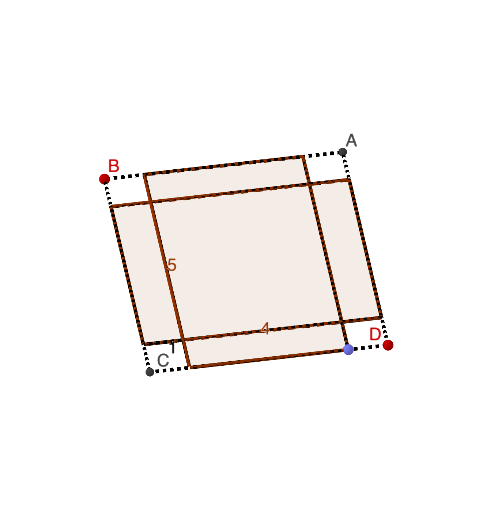
This example demonstrates how to calculate the volume of an open box by cutting squares from the corners of a rectangular piece of paper. It involves core mathematical concepts such as volume calculation, function graphing, differential calculus, tangent lines, and optimization. GeoGebra commands like Intersect, Segment, Point, Midpoint, Circle, Mirror, Rotate, and Polygon are used in the construction. Suitable for high school and above students to understand solid geometry, calculus, and function applications, particularly for optimization problems.
GeoGebra Commands & Parameters
Intersect(xAxis, yAxis) → ASegment(B_{1}, A) → fSegment(A, C_{1}) → gPoint(f) → DPoint(g) → BMidpoint(D, C) → GMidpoint(A, B) → HMidpoint(D, A) → JSegment(D, A) → jSegment(D, G) → hSegment(G, C) → iSegment(C, B) → kPoint(h) → ICircle(D, I) → cIntersect(c, j, 1) → KMirror(I, G) → I'Mirror(K, J) → K'Midpoint(C, B) → MSegment(J, M) → lMirror(I', l) → I''Mirror(I, l) → I'_{1}Mirror(L, l) → L'Segment(G, H) → mMirror(L, m) → L'_{1}Mirror(L', m) → L''Mirror(K', m) → K''Mirror(K, m) → K'_{1}Segment(K, K'_{1}) → nSegment(A, B) → pSegment(K', K'') → qSegment(I, I'_{1}) → rSegment(I', I'') → sRotate(I'_{1}, (-α), q) → NRotate(I'', (-α), q) → I'''Rotate(K, (-α), r) → K'_{2}Rotate(K', (-α), r) → K''_{1}Rotate(I, α, n) → I'_{2}Rotate(I', α, n) → I''_{1}Rotate(K'', α, s) → K'''Rotate(K'_{1}, α, s) → OPolygon(L, L', L'', L'_{1}) → q1, l_1, l', l'', l'_{1}Polygon(I''', L'', L', N) → q2, i''', t, a, n_1Polygon(K''_{1}, L', L, K'_{2}) → q3, k''_{1}, b, l_2, k'_{2}Polygon(I'_{2}, L, L'_{1}, I''_{1}) → q4, i'_{2}, l_3, d, i''_{1}Polygon(O, L'_{1}, L'', K''') → q5, o, e, f_1, k'''Segment(K'_{1}, K'') → g_1Segment(I', C) → h_1Segment(C, K'_{1}) → i_1Segment(G, I') → j_1Segment(K'', B) → k_1Segment(B, I'') → m_1Segment(I'_{1}, I'') → p_1Segment(D, K) → q_1Segment(D, I) → r_1Segment(K', A) → s_1Segment(A, I'_{1}) → t_1Segment(K, K') → a_1Segment(I, G) → b_1Segment(L'_{1}, K'_{1}) → c_1
AI Drawing Prompt Reference
Create a 2D net of an open rectangular box obtained from a sheet by cutting squares from its corners. Start from perpendicular axes and place a base segment with its endpoints, then construct several midpoints and use intersections between a circle (centered at a constructed midpoint) and a diagonal segment to get key points. Build symmetry by mirroring parts across the lines through the midpoints, producing multiple reflected boundary edges. Use rotations around appropriate pivot edges to angle the copied panels, and finally connect the resulting corner points to form several polygon faces arranged as the box’s net, clearly showing the fold lines and the open-top structure.
The prompt above was compiled from the original drawing commands and is for reference only.