
Spatial Conic Sections via Cutting a Cone with Moving Planes
Loading the math board and drawing, please wait…
In collections
Conic Section Collection
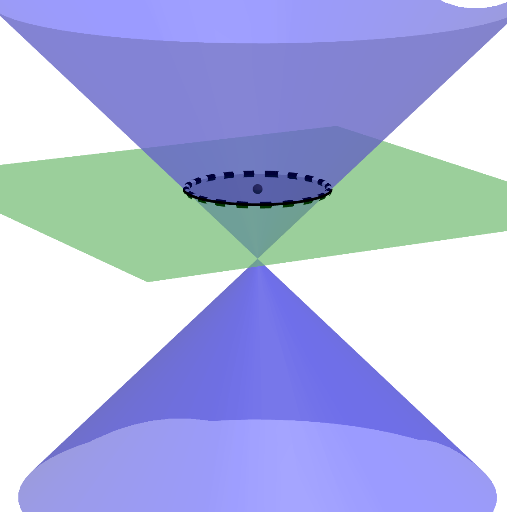
This GeoGebra example demonstrates how different 2D conic sections emerge as a plane intersects a cone in space. By moving and rotating the cutting plane, the intersection curve transforms, illustrating the geometric mechanism behind ellipses, parabolas, and hyperbolas. The key mathematics concepts include the definition of conic sections through cone–plane intersection, the role of plane position and orientation in determining the curve type, and supporting relations connected to linear functions, trigonometric/tangent-related geometry, and an integration perspective for interpreting curve-related accumulated quantities. Construction-wise, it leverages GeoGebra commands such as OrthogonalLine, Point, Midpoint, Line, Vector, Plane, Translate, Rotate, Sequence, and IntersectPath. The objects Plane/Planexy and Rotationplane (together with translateplanexy) manage the plane setup and its transformations, while opacity controls the visualization layers between the 3D cone/planes and the resulting intersection curve. Suitable for high-school to early university instruction in geometry and analytic geometry, with interactive value for conceptual understanding and guided exploration.
GeoGebra Commands & Parameters
OrthogonalLine(A, xOyPlane) → aPoint(a) → BMidpoint(A, B) → CLine(D, xAxis) → eVector(D) → uPlane((1, 0, 0), (0, 1, 0), (0, 0, 0)) → PlanexyTranslate(Planexy, u) → translateplanexyRotate(translateplanexy, (-α), e) → RotationplaneSequence(k, k, 1, 2, 1) → list2IntersectPath(Rotationplane, j) → p
AI Drawing Prompt Reference
Describe a dynamic curve formed by a plane cutting a cone. The plane can move and rotate, changing the intersection curve with the cone. The curve can be an ellipse, parabola, or hyperbola. Show how the curve changes as the plane's position and orientation change. Focus on understanding the geometric mechanism of cone-plane intersection and how the curve type is determined by the plane's position and orientation.
The prompt above was compiled from the original drawing commands and is for reference only.