
Level Curves and Contour Maps in GeoGebra
Loading the math board and drawing, please wait…
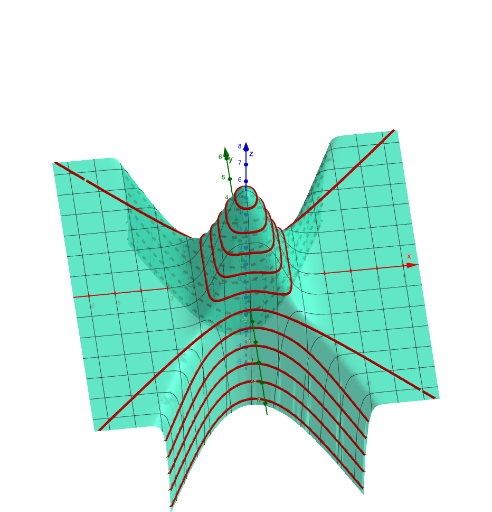
This example demonstrates how to construct level curves (horizontal slices) of a function and assemble them into contour maps to reveal the geometry of a surface. It focuses on key ideas such as level sets, contour lines, solving/visualizing implicit equation intersections, and organizing multiple height conditions into a coherent map. In GeoGebra, the construction uses IntersectPath and Intersect to compute intersection points between the function’s level condition and guiding paths/curves; then Vector and Translate are used to generate or shift geometric elements so multiple contours can be produced in sequence. The setup involves functions like f, g, h, k, p and a set of equation objects (eq1–eq8 and variants), which represent different equal-value constraints, producing contour-related objects (e.g., q, r, s, t and corresponding auxiliary curves). Suitable for high school to early university learners studying graphs, multivariable/function visualization, and for introductory calculus/multivariable sections where contour maps help interpret variation and gradients.
GeoGebra Commands & Parameters
IntersectPath(p, f) → eq1Intersect(zAxis, p) → AIntersect(yAxis, xAxis) → BVector(A, B) → uTranslate(eq1, u) → eq1'IntersectPath(r, f) → eq2IntersectPath(h_1, f) → eq3Intersect(zAxis, h_1) → CVector(C, B) → vTranslate(eq3, v) → eq3'IntersectPath(g, f) → eq4Intersect(zAxis, g) → DVector(D, B) → wTranslate(eq4, w) → eq4'IntersectPath(q, f) → eq5Intersect(zAxis, q) → EVector(E, B) → bTranslate(eq5, b) → eq5'IntersectPath(s, f) → eq6Intersect(zAxis, s) → FVector(F, B) → cTranslate(eq6, c) → eq6'IntersectPath(h, f) → eq7Intersect(zAxis, h) → GVector(G, B) → dTranslate(eq7, d) → eq7'IntersectPath(t, f) → eq8IntersectPath(t, f) → eq9Intersect(zAxis, t) → HVector(H, B) → eTranslate(eq8, e) → eq8'IntersectPath(r, f) → eq10IntersectPath(g_1, f) → eq11Intersect(zAxis, g_1) → IVector(I, B) → iTranslate(eq11, i) → eq11'IntersectPath(p_1, f) → eq12Intersect(zAxis, p_1) → JVector(J, B) → jTranslate(eq12, j) → eq12'IntersectPath(q_1, f) → eq13Intersect(zAxis, q_1) → KVector(K, B) → lTranslate(eq13, l) → eq13'IntersectPath(r_1, f) → eq14Intersect(zAxis, r_1) → LVector(L, B) → mTranslate(eq14, m) → eq14'
AI Drawing Prompt Reference
Draw a contour map of a function. The map should include multiple contour lines, such as horizontal lines and curves, determined by equal function values. Construct by finding intersections of the function with axes, then using vectors and translations to generate different contours. Ensure they are arranged correctly in the diagram.
The prompt above was compiled from the original drawing commands and is for reference only.