
Cycloid from Formula: Parametric Construction in GeoGebra
Loading the math board and drawing, please wait…
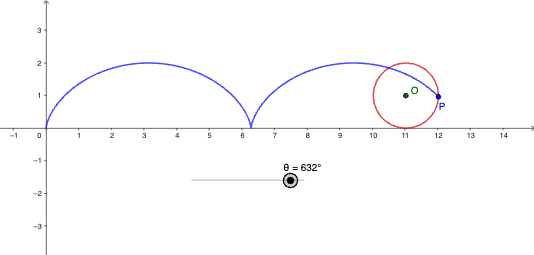
This example demonstrates how a cycloid (Cycloid) trajectory can be generated directly from a mathematical formula and visualized dynamically as the parameter varies. It centers on key ideas such as parametric equations, angle parameterization (using θ), trigonometric relationships, and the general concept of describing a curve as the locus of a moving point. The construction emphasizes how parameters like a and b control the geometric scale and overall shape. From the provided GeoGebra construction summary, it is built using CurveCartesian to render the parametric curve, together with Circle to construct the guiding/auxiliary circle. The involved objects include parameters and geometric elements such as r, θ, a, b, the center O, and additional points/variables (c, P) that serve as intermediate references for positioning and defining the curve. Suitable for upper-secondary to early university students studying coordinate geometry, parametric curves, and graphing in GeoGebra, and useful for teaching trajectory modeling and formula-to-visualization workflows.
GeoGebra Commands & Parameters
CurveCartesian((r * (t - sin(t))), (r * (1 - cos(t))), t, 0°, θ) → aCircle(O, r) → c
AI Drawing Prompt Reference
Create a parametric cycloid path on a coordinate plane using a parameter angle θ. Draw a curve defined by the parametric coordinates x = r·(t − sin(t)) and y = r·(1 − cos(t)), showing the portion corresponding to t from 0° up to θ. Add an auxiliary guiding circle centered at O with radius r. Emphasize the dependence on the trigonometric terms and how r scales the construction while θ controls the displayed parameter range.
The prompt above was compiled from the original drawing commands and is for reference only.