
Filled Polar “Sunny Variations” Curve Visualization
Loading the math board and drawing, please wait…
In collections
Curves
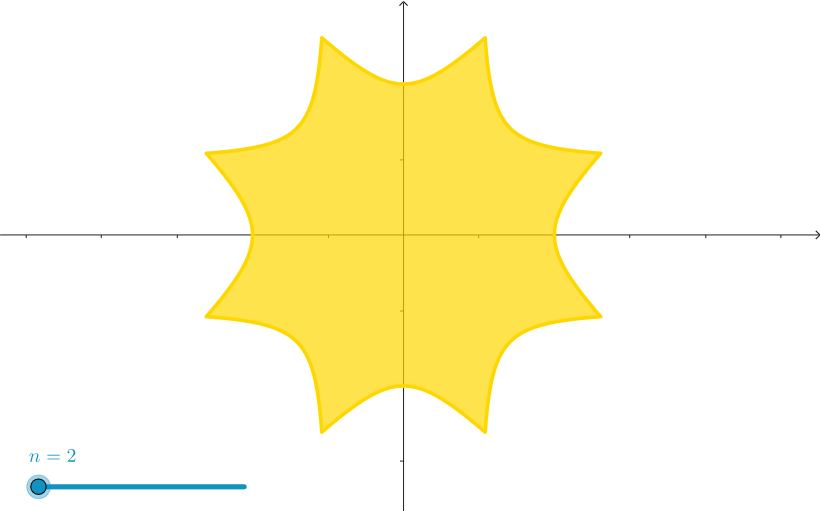
This example visualizes a sunny-style polar curve and fills the region to make the geometric shape stand out. It highlights key ideas such as polar curves, parameter-based curve drawing (using parameters to control the family/shape), and geometric plotting with area filling for clearer interpretation. The construction is derived from the provided GeoGebra essentials: it uses CurveCartesian to generate the curve path in coordinate form, and it relies on two referenced objects, n and c, to drive the curve’s definition and variation. Suitable for advanced high-school students, math enrichment/contest preparation, and as a GeoGebra teaching or self-study activity on parametric/coordinate-based curve sketching.
GeoGebra Commands & Parameters
CurveCartesian((sec((pi / 4 * (1 / 2 - asind(cos(((4 * n) * θ))) / pi))); θ), θ, 0, (2 * 3.141592653589793)) → c
AI Drawing Prompt Reference
Draw a polar curve resembling a sunny variation, with a wavy, flower-like outline. The curve is defined by a parameter that controls the number of petals and their amplitude. First trace the full closed curve path, then fill the enclosed area to make the shape stand out. The curve is symmetric around the center, with radiating lobes. Use a warm color like orange or gold for the fill, and keep the background plain to highlight the curve's details.
The prompt above was compiled from the original drawing commands and is for reference only.