
Classical Construction of a Rose Curve
Loading the math board and drawing, please wait…
In collections
History of Maths
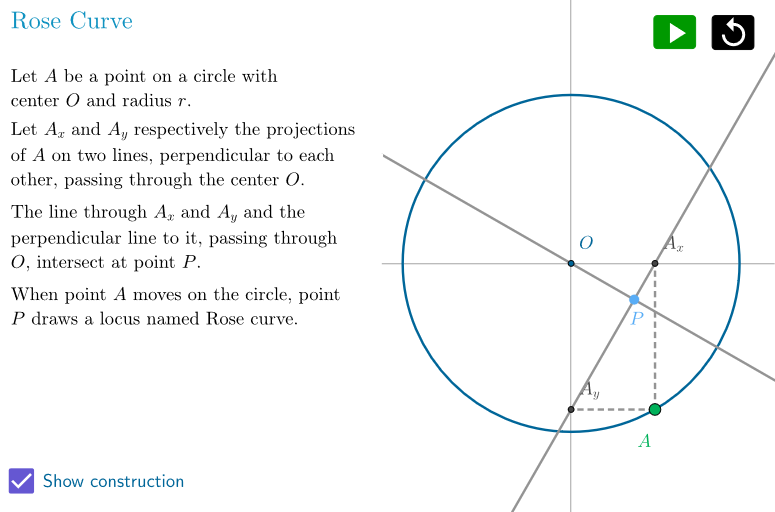
This example demonstrates a classical geometric construction for a rose curve, producing the characteristic flower-petal shape and its symmetry as the controlling parameter changes. The main ideas are parametric/locus thinking (building the curve as an evolving set of points), circle-based constructions, and intersection/orthogonal constraints to compute the next defining points. In GeoGebra, the construction relies on Circle to create the base circle, Point to define key objects (center, radius, and parameter-related points), Line and Segment to form guiding lines and bounded segments, OrthogonalLine to enforce perpendicular relationships for correct geometric positioning, and Intersect to compute intersection points that drive the curve’s iterative drawing. It is well suited for advanced middle school, high school, and introductory university use in geometry construction, curve sketching, and interactive graphing/visual learning.
GeoGebra Commands & Parameters
Circle((0, 0), r) → cPoint(c) → ALine(A_y, A_x) → dSegment(A, A_x) → aSegment(A, A_y) → bOrthogonalLine(O, d) → eIntersect(d, e) → P
AI Drawing Prompt Reference
Create a classical geometric construction of a rose curve. Begin with a base circle centered at the origin. Pick a point A on the circle, then draw a diagonal line through A at a 45-degree angle to the axes. From A, drop perpendiculars to both the x-axis and y-axis, forming rectangular guide segments. Through the origin, construct a line perpendicular to the diagonal line, intersecting it at point P. As point A travels around the circle, the locus of point P traces the rose curve, revealing its characteristic petal symmetry.
The prompt above was compiled from the original drawing commands and is for reference only.