
Parabolas, Lines and Nomograms
Loading the math board and drawing, please wait…
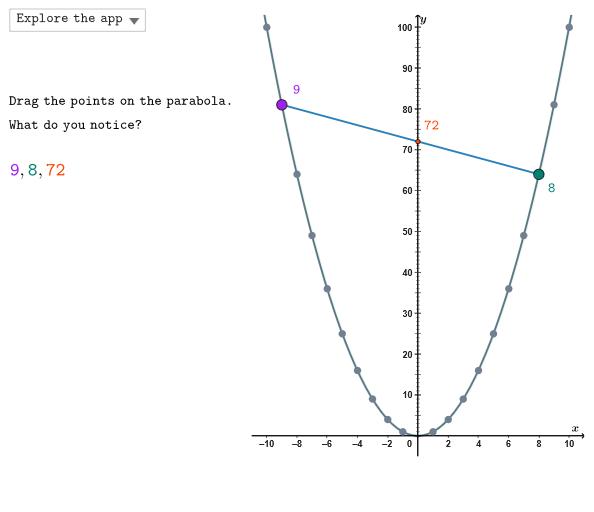
This example demonstrates how to use GeoGebra to create a nomogram for comparing confidence intervals and probability distributions of functions. Key mathematical concepts include coordinate geometry, function graphing, probability statistics, and geometric construction. The construction involves commands like Shuffle, Element, Polygon, Sequence, and setting coordinate ranges with sliders. Suitable for high school students or college undergraduates learning the integration of function graphs and statistical concepts.
GeoGebra Commands & Parameters
Shuffle({1, 2, 3}) → allCaseNum, {3, 2, 1}Element(allCaseNum, Mod[countQuestion, Length[allCaseNum]] + 1) → caseNumPolygon(GRMIN + ((-offX), (-offY)), (x(GRMAX), y(GRMIN)) + (offX, (-offY)), GRMAX + (offX, offY), (x(GRMIN), y(GRMAX)) + ((-offX), offY)) → peep, f, g, h, iSequence((k, 0), k, -10, 10, 1) → xGridJoin(Sequence[Sequence[(j, k), j, -10, 10, 1], k, -1, 17, 1]) → bigGridSequence((0, k), k, 1, 16, 1) → yGridSegment((x(GRMIN) - offX, 0), (x(GRMAX) + offX, 0)) → fakeXSegment((0, y(GRMIN) - offY), (0, y(GRMAX) + offY)) → fakeYSequence((n, par(n)), n, 1, 10) → posIntPoint(posInt) → P2Circle(ONBPT, pulsing) → pulsingObjectSequence((n, par(n)), n, -10, -1) → negIntPoint(negInt) → P1Segment(P1, P2) → segmProdSequence(Segment[(x(S) - 0.2, t), (x(S) + 0.2, t)], t, y(S), y(U), Distance[S, U] / 10) → longTicksSequence(Segment[(x(S) - 0.2, t), (x(S) + 0.2, t)], t, y(S), y(U), Distance[S, U] / 20) → mediumTicksSequence(Segment[(x(S) - 0.1, t), (x(S) + 0.1, t)], t, y(S), y(U), Distance[S, U] / 100) → shortTicksIntersect(segmProd, yAxis) → INLine(P1, P2) → linP12Intersect(linP12, x = -10.2) → R
AI Drawing Prompt Reference
Draw a coordinate-plane backdrop for comparison: show a square grid with x values from about −10 to 10 (and extended farther), plus a horizontal axis and a vertical axis crossing at the origin. Construct a quadrilateral/parallelogram-like region defined by shifted corners around the same coordinate bounds, giving a symmetric frame. Place two sets of points on the same vertical line positions using positive integers and negative integers, connect each negative-integer point to its corresponding positive-integer point to form a product line, then extend it into a reference line that intersects the left side boundary. Add a pulsing circle at a notable construction point and include small tick marks along the relevant segment direction to reinforce the “nomogram” style.
The prompt above was compiled from the original drawing commands and is for reference only.