
Conchoid of Nicomedes: constructing a parameter curve in GeoGebra
Loading the math board and drawing, please wait…
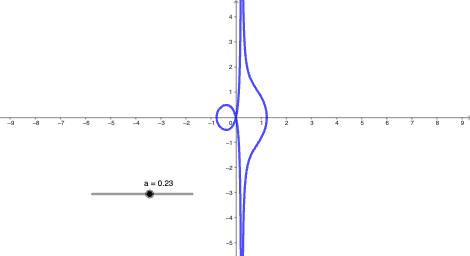
This GeoGebra example demonstrates how to construct and visualize the Conchoid of Nicomedes, a classical locus-based curve defined by a distance constraint relative to a given reference configuration. The key mathematical ideas include parametric (or parametrically defined) curves, coordinate-geometry construction, and the locus approach: the curve consists of points whose geometric relationship to a fixed line/point and a prescribed distance rule holds. Construction-wise, the example uses the GeoGebra command CurveCartesian to render a Cartesian-plane curve, with objects a and b serving as essential inputs/parameters for the generated curve. It is suitable for upper-secondary to university-level students learning coordinate geometry, analytic/locus curves, and hands-on geometric construction with GeoGebra.
GeoGebra Commands & Parameters
CurveCartesian(a + cos(t), (a * tan(t)) + sin(t), t, -10, 10) → b
AI Drawing Prompt Reference
Draw a Cartesian-plane parameter curve defined by the point (x(t), y(t)) where x(t) = a + cos(t) and y(t) = a * tan(t) + sin(t). Use the parameter t varying over the interval [-10, 10] and render the resulting trajectory as the curve. Treat the constant a as the key input that influences the curve’s shape and placement. First set the x(t) and y(t) expressions, then generate and display the curve for the specified t range.
The prompt above was compiled from the original drawing commands and is for reference only.