
Graphing Parametric Equations: Building Curves in Cartesian Coordinates
Loading the math board and drawing, please wait…
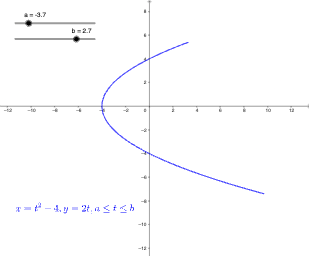
This example demonstrates how to plot parametric equations on a Cartesian plane to visualize the shape of parameterized curves (loci/trajectories). It focuses on the core idea that a curve is determined by coordinate functions (x(t), y(t)) and that varying parameters changes the resulting geometry. In GeoGebra, the construction uses the CurveCartesian command to create the curve from parameter-defined functions and associated parameters/constants. The construction summary indicates the use of function/object inputs f, g, parameters a, b, c, and a text label object (text1) to organize the mathematical definitions and provide clear annotations linking the plotted curve to its defining expressions. Suitable for secondary school through early undergraduate learners and for classroom demonstrations on graphing, loci, and parameter-driven geometry.
GeoGebra Commands & Parameters
CurveCartesian(f(t), g(t), t, a, b) → c
AI Drawing Prompt Reference
Draw a Cartesian coordinate plane with a smooth curve defined by parametric equations, where the x-coordinate and y-coordinate are each given by a function of a parameter t, and t ranges between two constant values. Include text labels near the curve showing the two coordinate function expressions, so the viewer can see how the curve shape arises from the parameterized functions. The overall image should emphasize the trajectory of the curve and the relationship between the coordinate functions and the resulting locus.
The prompt above was compiled from the original drawing commands and is for reference only.