
Conic Section as a Cone–Plane Intersection in Cylindrical Coordinates
Loading the math board and drawing, please wait…
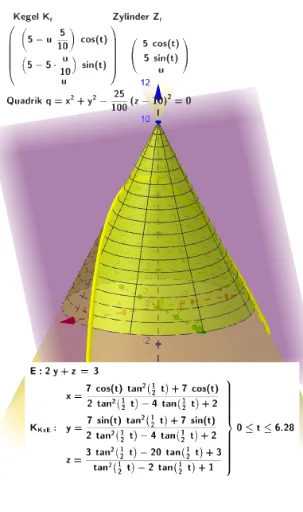
This example demonstrates how to visualize a conic section (e.g., an ellipse) as the intersection curve between a cone surface and a plane in 3D space. It focuses on the key idea that conic sections arise from slicing quadratic surfaces, and it uses cylindrical-coordinate parameterization to describe the geometry. The construction uses GeoGebra commands such as Surface and CurveCartesian to build the relevant surfaces and the resulting Cartesian parameter curve. Internally, the model defines parameter mappings and intersection-related quantities (e.g., h_r, r, r_x, K_r, Z_r) to convert cylindrical coordinates into 3D coordinates, then introduces parameters like q and labeling objects (text1, text3). Additional variables (fx, fy, fz, E, a, K_{KxE}, EP) help assemble the cone/plane intersection constraints into computable parametric expressions, yielding the final intersection locus. Suitable for high school to early undergraduate learners studying 3D analytic geometry, parametric equations, and conic sections.
GeoGebra Commands & Parameters
Surface(((r - (u * r / h_r)) * cos(t)), ((r - (r * u / h_r)) * sin(t)), u, u, 0, (h_r / r * r), t, 0, (2 * π)) → K_rSurface((r * cos(t)), (r * sin(t)), u, u, 0, h_r, t, 0, (2 * π)) → Z_rCurveCartesian(((-sqrt((-3 * t^(2)) + (8 * t) + 16))) / 2, t, (-2 * t), t, -10, 10) → aCurveCartesian(fx(t), fy(t), fz(t), t, 0, (2 * π)) → K_{KxE}Surface((s1, (-3 / 2 * s2), (3 * s2) + 3), s1, -10, 10, s2, -10, 10) → EP
AI Drawing Prompt Reference
Visualize a conic section as the intersection of a cone and a plane in 3D space using cylindrical coordinates. Parametrize the cone and plane surfaces, converting cylindrical coordinates to 3D coordinates. Draw the cone and plane surfaces, then plot their intersection curve, which forms an ellipse. Use parameters like h_r, r, and q to define and adjust the shapes, adding text labels to explain key concepts.
The prompt above was compiled from the original drawing commands and is for reference only.