
Surface Between Curves with Spline Boundaries
Loading the math board and drawing, please wait…
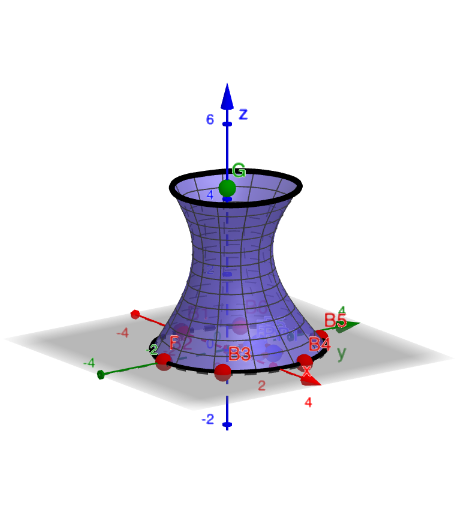
This example demonstrates how to construct a 3D surface that lies between (and is bounded by) spline curves, turning curve outlines into a coherent surface model. It highlights key ideas of spline/parametric-style curve modeling (Spline), Cartesian curve representation (CurveCartesian), and surface generation from curve boundaries (Surface). Geometrically, it uses auxiliary constructions such as point placement (PointIn) and orthogonal lines (OrthogonalLine) to locate control points and shape the boundary network before lofting/assembling the final patch. The build relies on commands and objects drawn from the construction summary: Polygon (framework/outline), PointIn (positional determination), OrthogonalLine (perpendicular projection/feet), Point (control and boundary points), Spline (the boundary curves), Surface (the generated surface), CurveCartesian (curve definitions in coordinate geometry), with a structured set of setup and control objects (e.g., Setup, A1–A4, q1, a1–a4, P1–P5, l1, F, G) culminating in mySurface. Suitable for high school through early university learners studying geometric construction, solid/3D visualization, and the connection between boundary curves and surfaces.
GeoGebra Commands & Parameters
Polygon(A1, A2, A3, A4) → q1, a1, a2, a3, a4PointIn(q1) → P1PointIn(q1) → P2PointIn(q1) → P3PointIn(q1) → P4OrthogonalLine(F, xOyPlane) → l1Point(l1) → GPointIn(q1) → P5Spline({P1, P2, P3, P4, P5}, 3) → s1Spline({B1, B2, B3, B4, B5, B6, B1}, 3) → b1Surface((y(s1(k)) * (x(b1(t)) - x(G))) + x(G), (y(s1(k)) * (y(b1(t)) - y(G))) + y(G), ((1 - k) * z(G)), k, 0, 1, t, 0, 1) → mySurfaceCurveCartesian(mySurface(0, t), t, 0, 1) → b2
AI Drawing Prompt Reference
Draw a 3D surface bounded by cubic spline curves. The curves define the boundaries, and the surface is generated from these boundaries. First, determine control points, then use orthogonal projections to locate auxiliary points, and finally create the surface. Ensure the surface matches the curve boundaries to form a continuous 3D model.
The prompt above was compiled from the original drawing commands and is for reference only.