
Parametric “Flight” Trajectory: A Geometric View of Riemann Sums
Loading the math board and drawing, please wait…
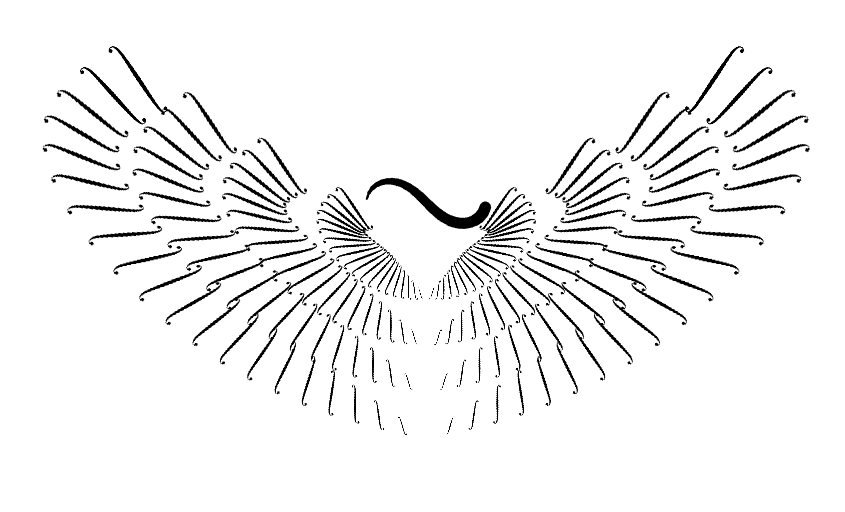
This GeoGebra example animates a curve that moves like a “flight path,” driven by a parameter. It visually links the shape of a parametric trajectory to discrete approximations of accumulated quantities, echoing the idea behind upper/lower sums (Riemann sums). The main concepts include parametric curves constructed via spline tools, geometric length using Pythagorean-style distance reasoning, and change information via difference/slope. The construction relies on GeoGebra commands such as Spline for the base curve, Sequence (and Zip) to generate parameter/sample points, CurveCartesian to build the parametric curve in Cartesian coordinates, Segment and Length to measure geometric contributions, Element and Reverse to manage curve parts and ordering, and Translate/Mirror to assemble symmetric or shifted components. Text annotations and frame/t control support the step-by-step, animated interpretation. Suitable for high-school to early university instruction on parametric equations, curve visualization, and the intuition behind Riemann-sum-style approximation, including interactive learning or classroom demonstrations.
GeoGebra Commands & Parameters
Spline(L, 3) → frameTranslate(Dilate[frame, 0.9], Vector[(0, 0)]) → f1Translate(Dilate[frame, 1.8], Vector[(0, -1)]) → f2Translate(Dilate[frame, 2.7], Vector[(0, -2)]) → f3Translate(Dilate[frame, 3.6], Vector[(0, -3)]) → f4Sequence(k, k, 0, 1, 0.05) → LtZip(f1(k), k, Lt) → P1Zip(f2(k), k, Lt) → P2Zip(f3(k), k, Lt) → P3Zip(f4(k), k, Lt) → P4Zip(Dilate[Rotate[Translate[pic1, Vector[v]], (k * pi / Length[P4]) - pi / 8, P], ln(k) / 3, P], v, P4, P, P4, k, 1…Length[P4]) → F4Zip(Dilate[Rotate[Translate[pic1, Vector[v]], (k * pi / Length[P1]) - pi / 8, P], (ln(k) / 4 * 0.85), P], v, P1, P, P1, k, 1…Length[P1]) → F1Zip(Dilate[Rotate[Translate[pic1, Vector[v]], (k * pi / Length[P2]) - pi / 8, P], (ln(k) / 3.2 * 0.9), P], v, P2, P, P2, k, 1…Length[P2]) → F2Zip(Dilate[Rotate[Translate[pic1, Vector[v]], (k * pi / Length[P3]) - pi / 8, P], (ln(k) / 3.1 * 0.95), P], v, P3, P, P3, k, 1…Length[P3]) → F3Mirror(F1, yAxis) → G1Mirror(F2, yAxis) → G2Mirror(F3, yAxis) → G3Mirror(F4, yAxis) → G4Sequence((0, -4 + (k * 4 / 4)), k, 1, 4) → LvText("\scalebox{5}{\infty}", O + (0, 2), true, true, 0) → infTxtCurveCartesian(((0.9 * sqrt(2)) * cos(t) / ((sin(t))^(2) + 1)), (((0.9 * sqrt(2)) * cos(t)) * sin(t) / ((sin(t))^(2) + 1)) + 2, t, 0, (2 * pi)) → curveReverse(Sequence[curve(k + t), k, 0, 3, 0.1]) → LPsElement(LPs, 1) → Q1Element(LPs, 2) → Q2Element(LPs, 3) → Q3Element(LPs, 4) → Q4Element(LPs, 5) → Q5Element(LPs, 6) → Q6Element(LPs, 7) → Q7Element(LPs, 8) → Q8Element(LPs, 9) → Q9Element(LPs, 10) → Q10Element(LPs, 11) → Q11Element(LPs, 12) → Q12Element(LPs, 13) → Q13Element(LPs, 14) → Q14Element(LPs, 15) → Q15Element(LPs, 16) → Q16Element(LPs, 17) → Q17Element(LPs, 18) → Q18Element(LPs, 19) → Q19Element(LPs, 20) → Q20Element(LPs, 21) → Q21Element(LPs, 22) → Q22Element(LPs, 23) → Q23Element(LPs, 24) → Q24Element(LPs, 25) → Q25Element(LPs, 26) → Q26Segment(Q1, Q2) → S1Segment(Q2, Q3) → S2Segment(Q3, Q4) → S3Segment(Q4, Q5) → S4Segment(Q5, Q6) → S5Segment(Q6, Q7) → S6Segment(Q7, Q8) → S7Segment(Q8, Q9) → S8Segment(Q9, Q10) → S9Segment(Q10, Q11) → S10Segment(Q11, Q12) → S11Segment(Q12, Q13) → S12Segment(Q13, Q14) → S13Segment(Q14, Q15) → S14Segment(Q15, Q16) → S15Segment(Q16, Q17) → S16Segment(Q17, Q18) → S17Segment(Q18, Q19) → S18Segment(Q19, Q20) → S19Segment(Q20, Q21) → S20Segment(Q21, Q22) → S21Segment(Q22, Q23) → S22Segment(Q23, Q24) → S23Segment(Q24, Q25) → S24Segment(Q25, Q26) → S25Element(LPs, 27) → Q27Element(LPs, 28) → Q28Element(LPs, 29) → Q29Element(LPs, 30) → Q30Element(LPs, 31) → Q31Segment(Q26, Q27) → S26Segment(Q27, Q28) → S27Segment(Q28, Q29) → S28Segment(Q29, Q30) → S29Segment(Q30, Q31) → S30Length(LPs) → m
AI Drawing Prompt Reference
Draw a parametric flight-like trajectory based on a smooth spline curve, with four vertically stacked copies that are progressively scaled up and shifted downward. On each copy, place a sequence of sample points, and at each point attach a small rotated and scaled motif, creating a patterned band along the path. Mirror the left-side motifs to the right for symmetry. Additionally, draw a closed curve (resembling an ellipse or cardioid) and mark a series of equally spaced points along it, connecting them with segments to illustrate discrete approximation. The overall composition includes layered curves, point sets, symmetric motifs, and a closed path, visually linking parametric motion to Riemann-sum-style accumulation.
The prompt above was compiled from the original drawing commands and is for reference only.