
Cauchy Integral Formula Example: Circle-Based Complex Integration Construction
Loading the math board and drawing, please wait…
In collections
Complex Analysis: A visual and interactive introduction
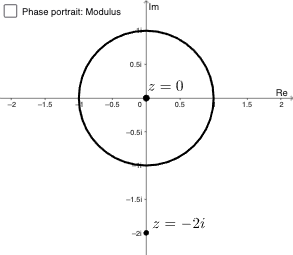
This example visualizes the key message of the Cauchy Integral Formula by constructing a closed integration contour (a circle in the complex plane) and positioning essential points relative to it. The main mathematical concepts include the Cauchy Integral Formula from complex analysis, the role of a circular contour (closed curve) in determining integral values from data inside the region, and the geometric encoding of those relationships via circle intersections. Construction highlights based on the GeoGebra summary: it uses the commands Intersect and Circle; objects C and c represent circle entities, while a, A, and B serve as control/anchor geometric elements. The picture container pic1 organizes the scene, and points D and E are obtained as intersection points (from circles/geometry elements), enabling a clear “contour–interior point–derived intersection points” configuration. Suitable for students learning complex analysis (early undergraduate / advanced high school), especially for teaching-oriented visualization of contour integration ideas.
GeoGebra Commands & Parameters
Intersect(xAxis, yAxis) → CCircle(C, 1) → c
AI Drawing Prompt Reference
Draw a unit circle centered at the origin using the intersect command to find where the circle meets the axes. Then select two points A and B on the circle to construct a closed contour for complex integration.
The prompt above was compiled from the original drawing commands and is for reference only.