
Geometric Visualization of Complex Roots via Polar Form
Loading the math board and drawing, please wait…
In collections
Complex Analysis: A visual and interactive introduction
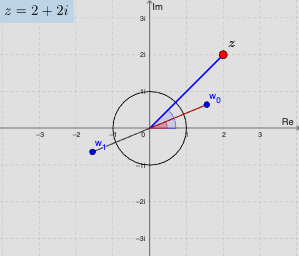
This example demonstrates how complex roots of an equation can be visualized on the complex plane by combining circular geometry with angle and polygon/segment constructions. It highlights key ideas such as polar representation of a complex number Z = r(cos θ + i sin θ), the geometric generation of n complex roots (n-fold symmetry with equally spaced arguments), and how amplitude (radius) and phase (argument) determine the positions of the roots. In GeoGebra construction, it uses Sequence to generate the list of angles/indices and to create root points; Circle (and optionally Polygon) to provide the reference circle and connect or outline the root configuration; Segment and Angle for geometric relations; Element to access items from constructed sequences; Textfield/labels to annotate θ, phase, and parameters; and TableText to present computed values in a readable table. Interactive inputs such as InputBox and control elements help students explore how changing parameters moves the root pattern. Suitable for high school to early undergraduate instruction, especially for complex numbers, geometric construction, and graphing-style learning.
GeoGebra Commands & Parameters
Sequence((r^(1 / n) * exp((ί * (theta / n + ((2 * pi) * k / n))))), k, 0, n - 1) → nRootsTextfield(phase) → InputBox1Textfield(modz) → InputBox2Polygon(nRoots) → polyCircle((0, 0), 1) → cUnitSegment((0, 0), Z) → s1Segment((0, 0), Element[nRoots, 1]) → s2Angle((100, 0), (0, 0), Z) → a1Angle((100, 0), (0, 0), Element[nRoots, 1]) → a2Segment((0, 0), Z1) → s1aElement(nRoots, 1) → w_{0}Element(nRoots, 2) → w_{1}Element(nRoots, 3) → w_{2}Element(nRoots, 4) → w_{3}Element(nRoots, 5) → w_{4}Element(nRoots, 6) → w_{5}Element(nRoots, 7) → w_{6}Element(nRoots, 8) → w_{7}Element(nRoots, 9) → w_{8}Element(nRoots, 10) → w_{9}Sequence({Element[listz, i]}, i, 1, n) → listz1TableText(listz1) → text01
AI Drawing Prompt Reference
Draw a unit circle centered at the origin on the complex plane. Mark a complex number point and show its polar form with a vector from the origin and the angle it makes with the positive real axis. Generate a set of equally spaced complex root points around the origin based on the given modulus and argument, forming a symmetric pattern. Connect these root points with line segments to outline a polygon, and label each root. Include input boxes to adjust the argument and modulus, and display a table listing the computed root values.
The prompt above was compiled from the original drawing commands and is for reference only.