
Complex Number Roots Visualization
Loading the math board and drawing, please wait…
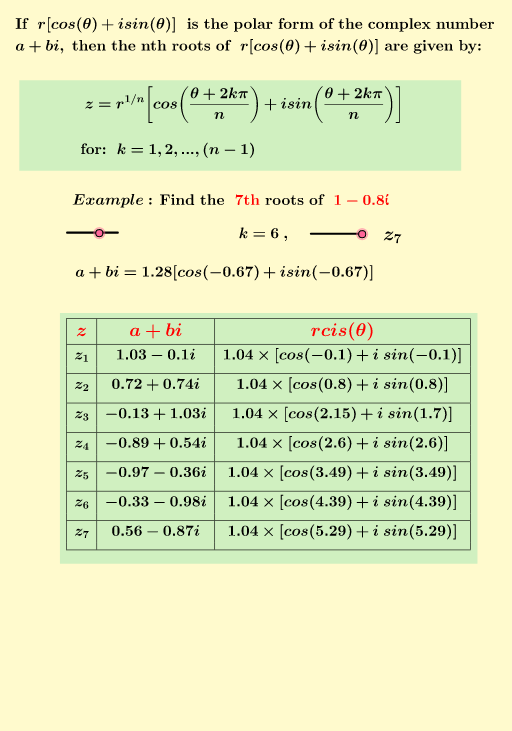
This example demonstrates how to visualize the n-th roots of complex numbers and their geometric distribution. Key math concepts include complex numbers, root locations, polar coordinates, and trigonometric functions. Construction highlights involve commands like Sequence, Element, Intersect, Vector, Point, Segment, If, TableText, and Polygon from GeoGebra. Suitable for high school and above students to understand complex operations and geometric intuition.
GeoGebra Commands & Parameters
Sequence((j^(1 / n) * (cos((atan(b / a) + ((2 * q) * π)) / n) + (ί * sin((atan(b / a) + ((2 * q) * π)) / n)))), q, 0, k) → Sequence2, {1.0311581284881526 - 0.0997039294804784ί, 0.7208682482097111 + 0.7440275050185309ί, -0.13225012600310243 + 1.0274910528433818ί, -0.8857814579246445 + 0.5372328808793527ί, -0.9723012853800516 - 0.3575726079404533ί, -0.32665841361255604 - 0.9831186298291604ί, 0.5649649062224906 - 0.8683562714911719ί}Element(Sequence2, 1) → A2Element(Sequence2, 2) → A3Element(Sequence2, 3) → A4Element(Sequence2, 4) → A5Element(Sequence2, 5) → A6Element(Sequence2, 6) → A7Element(Sequence2, 7) → A8Element(Sequence2, 8) → A9Element(Sequence2, 9) → A10Element(Sequence2, 10) → A11Intersect(xAxis, yAxis) → AVector(A, A2) → uVector(A, A3) → vVector(A, A4) → wVector(A, A5) → a_{1}Vector(A, A6) → b_{1}Vector(A, A7) → cVector(A, A8) → dVector(A, A9) → eVector(A, A10) → fVector(A, A11) → gPoint(yAxis) → BPoint(yAxis) → CSegment(B, C) → hPoint(xAxis) → DPoint(xAxis) → ESegment(D, E) → iVector((a, b)) → pIntersect(eq1, i) → F, GIntersect(eq1, h) → H, IElement(Sequence1, 1) → B2Element(Sequence1, 2) → B3Element(Sequence1, 3) → B4Element(Sequence1, 4) → B5Element(Sequence1, 5) → B6Element(Sequence1, 6) → B7Element(Sequence1, 7) → B8Element(Sequence1, 8) → B9Element(Sequence1, 9) → B10Element(Sequence1, 10) → B11If(k ≥ 0, B2 + "") → C14If(k ≥ 1, B3 + "") → C15If(k ≥ 2, B4 + "") → C16If(k ≥ 3, B5 + "") → C17If(k ≥ 4, B6 + "") → C18If(k ≥ 5, B7 + "") → C19If(k ≥ 6, B8 + "") → C20If(k ≥ 7, B9 + "") → C21If(k ≥ 8, B10 + "") → C22If(k ≥ 9, B11 + "") → C23Sequence(Element[Sequence3, α + 1], α, 0, k) → SequenceA, {"z_1", "z_2", "z_3", "z_4", "z_5", "z_6", "z_7"}Sequence(Element[Sequence2, α + 1], α, 0, k) → SequenceB, {1.0311581284881526 - 0.0997039294804784ί, 0.7208682482097111 + 0.7440275050185309ί, -0.13225012600310243 + 1.0274910528433818ί, -0.8857814579246445 + 0.5372328808793527ί, -0.9723012853800516 - 0.3575726079404533ί, -0.32665841361255604 - 0.9831186298291604ί, 0.5649649062224906 - 0.8683562714911719ί}Sequence(Element[Sequence4, α + 1], α, 0, k) → SequenceC, {" 1.04×\left [cos\left(-0.1\right)+i\;sin\left( -0.1 \right)\right ]\cr", " 1.04×\left [cos\left(0.8\right)+i\;sin\left( 0.8 \right)\right ]\cr", " 1.04×\left [cos\left(2.15\right)+i\;sin\left( 1.7 \right)\right ]\cr", " 1.04×\left [cos\left(2.6\right)+i\;sin\left( 2.6 \right)\right ]\cr", " 1.04×\left [cos\left(3.49\right)+i\;sin\left( 3.49 \right)\right ]\cr", " 1.04×\left [cos\left(4.39\right)+i\;sin\left( 4.39 \right)\right ]\cr", " 1.04×\left [cos\left(5.29\right)+i\;sin\left( 5.29 \right)\right ]\cr"}TableText({Append["\large\red{z}", SequenceA], Append["\large\red{a+bi}", SequenceB], Append["\large\red{rcis(θ)}", SequenceC]}, "vc|_") → text24Polygon(A2, A3, n) → poly1, t, r_1, K, L, M, N, O, P, Q, S, f_1, g_1, h_1, i_1, l_1, m_1, p_1, q_1
AI Drawing Prompt Reference
Draw the visualization of n-th roots of complex numbers, including point A at the intersection of the x-axis and y-axis, and 10 vectors originating from A, representing the n-th roots of complex numbers. Use trigonometric functions and polar coordinates to define these vectors, and show their relationships through intersections and segments, forming the geometric distribution of complex roots.
The prompt above was compiled from the original drawing commands and is for reference only.