
Power of a Complex Number
Loading the math board and drawing, please wait…
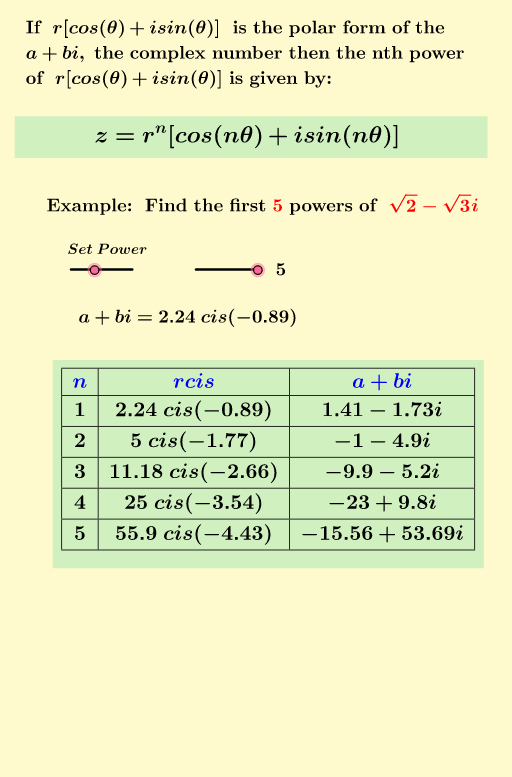
This example demonstrates the geometric representation of complex number power operations in the plane. Key math concepts include polar form of complex numbers, Euler's formula, rotation, and scaling. Construction highlights involve commands like Intersect, Point, Segment, Vector, Element, If, Sequence, Textfield, and TableText to create complex number representations, rotational animations, and loci. Suitable for high school and above students to understand the geometric meaning and dynamic changes of complex operations.
GeoGebra Commands & Parameters
Intersect(xAxis, yAxis) → APoint(yAxis) → BPoint(yAxis) → CSegment(B, C) → hPoint(xAxis) → DPoint(xAxis) → ESegment(D, E) → iVector((a, b)) → pElement(Sequence1, 1) → B2Element(Sequence1, 2) → B3Element(Sequence1, 3) → B4Element(Sequence1, 4) → B5Element(Sequence1, 5) → B6Element(Sequence1, 6) → B7Element(Sequence1, 7) → B8Element(Sequence1, 8) → B9Element(Sequence1, 9) → B10Element(Sequence1, 10) → B11If(k ≥ 0, B2 + "") → C14If(k ≥ 1, B3 + "") → C15If(k ≥ 2, B4 + "") → C16If(k ≥ 3, B5 + "") → C17If(k ≥ 4, B6 + "") → C18If(k ≥ 5, B7 + "") → C19If(k ≥ 6, B8 + "") → C20If(k ≥ 7, B9 + "") → C21If(k ≥ 8, B10 + "") → C22If(k ≥ 9, B11 + "") → C23Sequence(Element[Sequence3, α + 1], α, 0, k) → SequenceA, {"1", "2", "3", "4", "5"}Sequence(Element[rcisθ, α + 1], α, 0, k) → Sequencercisθ, {" 2.24\;cis\left(-0.89\right)", " 5\;cis\left(-1.77\right)", " 11.18\;cis\left(-2.66\right)", " 25\;cis\left(-3.54\right)", " 55.9\;cis\left(-4.43\right)"}Sequence(Element[Powers, l + 1], l, 1, k) → l1, {-0.9999999999999991 - 4.898979485566357ί, -9.899494936611665 - 5.196152422706635ί, -23.000000000000007 + 9.797958971132704ί, -15.556349186104075 + 53.693575034635195ί}Sequence(Vector[p^(Ω + 1)], Ω, 1, k) → u, {(-0.9999999999999991, -4.898979485566357), (-9.899494936611665, -5.196152422706635), (-23.000000000000007, 9.797958971132704), (-15.556349186104075, 53.693575034635195)}Sequence(Element[Powers, α + 1], α, 0, k) → PowersB, {1.4142135623730951 - 1.7320508075688772ί, -0.9999999999999991 - 4.898979485566357ί, -9.899494936611665 - 5.196152422706635ί, -23.000000000000007 + 9.797958971132704ί, -15.556349186104075 + 53.693575034635195ί}Textfield(a) → InputBox1Textfield(b) → InputBox2TableText({Append["\blue{n}", SequenceA], Append["\blue{rcis}", Sequencercisθ], Append["\blue{a+bi}", PowersB]}, "vc|_") → text1
AI Drawing Prompt Reference
Construct a complex-plane Cartesian diagram for complex-number power operations. Start by marking several points on the x- and y-axes, connect two pairs with line segments, and use one resulting direction as the vector reference. Then, based on a chosen initial complex number, generate sequences of points for consecutive powers and the corresponding vector positions as the parameter runs from 1 to the chosen limit. In parallel, generate another sequence using the polar form (rcisθ) for the same exponents. Finally, add a table-style text display showing n, the rcis expression values, and the corresponding a+bi (real-imaginary) values for each step.
The prompt above was compiled from the original drawing commands and is for reference only.