
Visualizing Operations on Two Sets (Intersection, Difference, Complement)
Loading the math board and drawing, please wait…
In collections
Sets
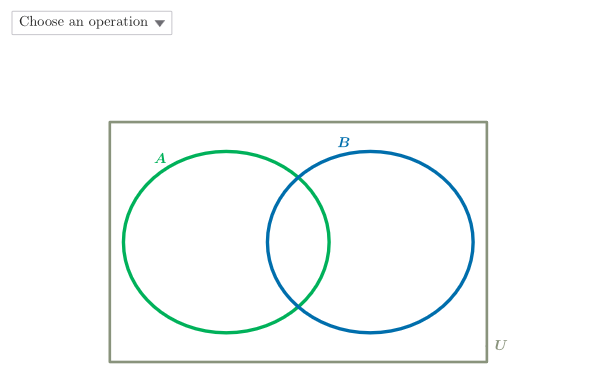
This GeoGebra example demonstrates how standard set operations on two sets can be represented visually in the plane and then used to solve short checking problems. It focuses on the geometric/analytical interpretation of set theory: intersection (common part), union (combined coverage), set difference (A\B and B\A), and complement/relative complement as the “remaining” region after removing parts. The construction uses geometry to make the algebraic operations tangible. From the construction summary: Point, Segment, and Polygon define key points, edges, and bounded regions; Vector supports auxiliary directed constructions; Intersect computes boundary intersection points; Arc and multiple arc objects (e.g., arcARight/arcALeft and arcBRight/arcBLeft) build curved boundaries; Locus generates loci to form evolving outlines. Objects such as INTUP/INTDWN represent intersection boundaries, while named difference objects like AMinusB and BMinusA correspond directly to the displayed “set minus” results. ddMenu and testo5–testo9 help switch between operations and verify understanding. Suitable for upper secondary and introductory university learners studying set theory and for classroom visualization with GeoGebra.
GeoGebra Commands & Parameters
Segment(A, B) → aPolygon({A, B, C, D}) → poli1Point(xAxis) → EPoint(xAxis) → FVector(E, F + (1.5, 0)) → transVecIntersect(eA, eB, 2) → INTUPIntersect(eA, eB, 1) → INTDWNArc(eA, INTDWN, INTUP) → arcARightArc(eB, INTUP, INTDWN) → arcBLeftArc(eA, INTUP, INTDWN) → arcALeftArc(eB, INTDWN, INTUP) → arcBRightPoint({arcALeft, arcBLeft}) → AMBLocus(AMB', AMB) → AMinusBPoint({arcARight, arcBRight}) → BMALocus(BMA', BMA) → BMinusA
AI Drawing Prompt Reference
Draw two overlapping circular regions representing two sets. Use a polygon to frame the overall area and place two points on the horizontal axis to define a translation direction. Find the two intersection points of the circleshol, then connect them with arcs to form left and right curved boundaries. At the intersection of the left arcs, generate a locus representing set A minus B; at the intersection of the right arcs, generate another locus for set B minus A. The overall figure visualizes set operations like intersection and difference geometrically.
The prompt above was compiled from the original drawing commands and is for reference only.