
Multiplying 3-Digit by 1-Digit Using a Flexible Area Model
Loading the math board and drawing, please wait…
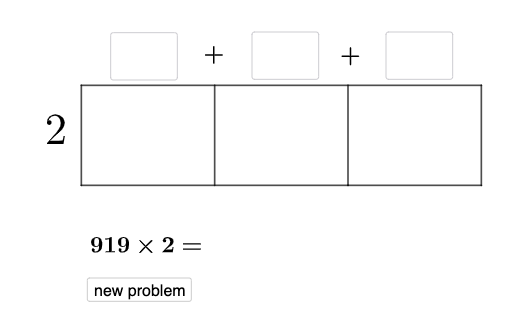
This example demonstrates how a 3-digit number times a 1-digit number can be represented with a flexible area (rectangular region) model, breaking the product into computable sub-areas. It highlights the connection between multiplication and area using a partition strategy based on the distributive idea and place-value decomposition of natural numbers. The construction uses GeoGebra commands and objects from the provided build summary: Random to generate variable factors (e.g., firstno/secondno), Point and Segment to create key geometric points and edges, Vector plus Translate to replicate and place sub-rectangles by translations, and Polygon to assemble the partitioned regions. Textfield is used for labeling intermediate values and the final product (e.g., text labels and an answer guess display). Conditional logic via If and display-control flags (such as toptrue-related objects) supports interactive structure. Suitable for primary to lower-secondary learners, as well as math visualization lessons and GeoGebra-based exploratory learning focused on understanding multiplication through geometry.
GeoGebra Commands & Parameters
Random(2, 9) → e_5Random(1, 9) → wRandom(0, 9) → vRandom(1, 9) → uRandom(1, 9) → a_1Random(0, 9) → w_1Random(0, 9) → b_2Point(yAxis) → DPoint(yAxis) → LRandom(1, 9) → o_{3}Random(1, 9) → b_1Textfield(d_1) → aTextfield(m_1) → bTextfield(ansguess) → rIf(n_1 ≟ v, "√", "X") → text3If(ansguess ≟ produc, "☺", "☹ ") → text7Segment(D, K) → p_{3}Vector(L, D) → c_{3}Translate(D, c_{3}) → D'Translate(J, c_{3}) → J'Translate(K, c_{3}) → K'Vector(D, J) → iTranslate(K, i) → K'_{1}Translate(K', i) → K''Segment(D', K'') → j_{5}Segment(K, K'_{1}) → i_1Segment(K', K) → h_2Segment(J', J) → i_2Segment(D', D) → k_2Textfield(c_2) → hTextfield(e_2) → jTextfield(n_2) → kTextfield(r_2) → cIf(toptrue, "√", "X") → text2Polygon(D, J, J', D') → q3, d_3, j_3, j', d'Polygon(J, K, K', J') → q4, j_4, k_3, k', s_2Polygon(K, K'_{1}, K'', K') → q7, k_4, k'_{1}, k'', t_2Segment(K'', K'_{1}) → m_{3}
AI Drawing Prompt Reference
In a coordinate plane, choose two reference vertical lines and place key points on each to serve as the left and right boundaries. Add several text labels near relevant points to indicate intermediate digit values and the final product position. Construct a base segment between the chosen points, then define a vector along the horizontal direction and use translations to create shifted pairs of boundary points on the same vertical lines. Connect the translated points with segments to close rectangular partitions, assembling a 3-part area model: one polygon spanning the left boundary to its translated counterpart, a second polygon spanning the middle boundaries and their translations, and a third polygon on the right side. Finally, add additional segments to complete the shared edges between adjacent rectangles and place the remaining text elements for intermediate results and an answer indicator.
The prompt above was compiled from the original drawing commands and is for reference only.