
Flip-Slide Transformation with a Perpendicular Vector
Loading the math board and drawing, please wait…
In collections
Congruence Transformations
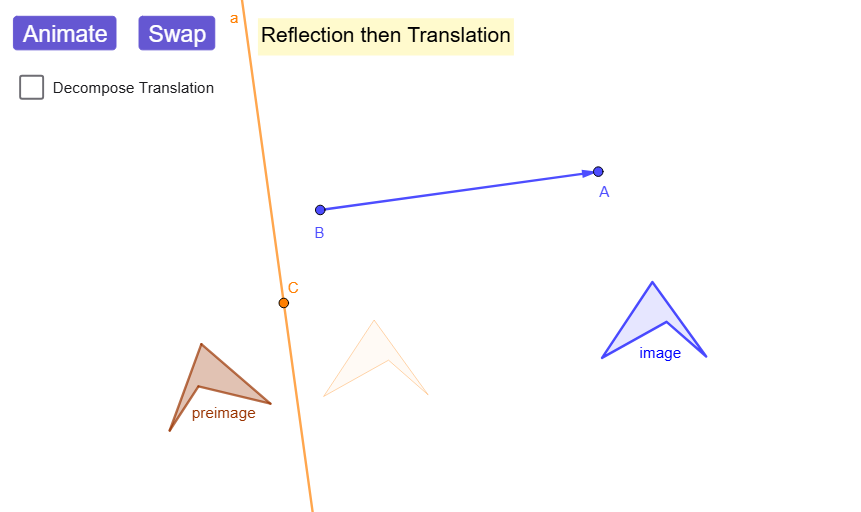
This example demonstrates the Flip-Slide (a reflection followed by a translation) by constructing how points and composite shapes move to their transformed positions, and it uses animation to make the process observable. The key mathematics includes vector concepts (including a perpendicular direction), rigid transformations, and their composition: Mirror (reflection across a line) combined with Translate (translation). It also uses geometric construction tools to build and verify the figure: Line and OrthogonalLine set up the reflection axis using a perpendicular vector; Vector encodes direction/movement; Polygon and Circle create the starting shape; Intersect finds corresponding or controlling points; If handles conditional construction logic. The construction organizes intermediate states via lists (e.g., reflectedList, ReflTranslList, RTreflectedShape, RTtranslated) and drives the motion using animator/animatorR/animatorT and showTranslationDeco. Suitable for secondary students and early university learners exploring geometric transformations, coordinate-geometry-style reasoning, and dynamic proof by visualization.
GeoGebra Commands & Parameters
Line(A, B) → fVector(B, A) → uOrthogonalLine(C, u) → aPolygon(F, G, H, I) → preimage, f_1, g_1, h_1, i_1Mirror(F, a) → F'Mirror(G, a) → G'Mirror(H, a) → H'Mirror(I, a) → I'Mirror(preimageList, a) → reflectedListTranslate(reflectedList, u) → ReflTranslListPolygon(reflectedList) → RTreflectedShapePolygon(ReflTranslList) → RTtranslatedOrthogonalLine(D, f) → bIntersect(f, b) → ECircle(E, abs(u) / 2) → c_{1}Intersect(c_{1}, f, 1) → JOrthogonalLine(J, f) → cIf(animator < 1, animator, 0) → animatorRIf(animator > 1, animator - 1, 0) → animatorTPolygon(AnimRTtranslList) → AnimRTTranslPolygon(AnimRTreflectedList) → AnimRTreflMirror(RTreflectedShape, b) → RTintermediaryTranslTranslate(preimageList, u) → TRtranslatedListMirror(TRtranslatedList, a) → TRreflectedListPolygon(TRtranslatedList) → TRtranslatedShapePolygon(TRreflectedList) → TRreflectedShapePolygon(AnimTRtranslList) → AnimTRtranslShapePolygon(AnimTRreflList) → AnimTRreflectedShapeMirror(F, b) → F'_{1}Mirror(G, b) → G'_{1}Mirror(H, b) → H'_{1}Mirror(I, b) → I'_{1}Polygon(F'_{1}, G'_{1}, H'_{1}, I'_{1}) → TRIntermediarTransl, f'_{1}, g'_{1}, h'_{1}, i'_{1}
AI Drawing Prompt Reference
Draw a transformation diagram on a plane with one chosen line as the reflection axis. Define a translation direction using a perpendicular vector to that axis, and use an auxiliary perpendicular line to set up the construction. Create a control point from the intersection of the axis line with the perpendicular helper, then construct a circle centered at that point with radius based on half the vector’s length and find an additional intersection point to complete the setup. Build a quadrilateral as the preimage shape, then reflect its four vertices across the reflection axis to get the reflected vertices and polygon. Translate the reflected vertices by the same vector to obtain the final “flip-slide” position, and mirror intermediate translated points across the second perpendicular line for comparison, so the sequence of reflection followed by translation is clearly shown.
The prompt above was compiled from the original drawing commands and is for reference only.