
Static Demo of a Turn–Turn (Turn-Turn) Transformation
Loading the math board and drawing, please wait…
In collections
Congruence Transformations
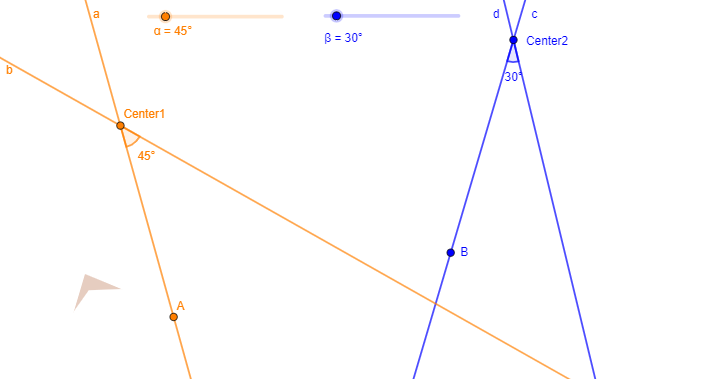
This GeoGebra example demonstrates the geometric effect of a “turn–turn” (turn–turn) transformation: applying consecutive transformations (notably rotations around specified centers) produces corresponding points, angles, and polygonal configurations that match a designed symmetry pattern. It centers on core topics such as rotation as a geometric transformation, angle construction/measurement, and the resulting relationships among transformed vertices and drawn segments. Construction uses the commands Line, Rotate, Angle, and Polygon, with objects including two rotation/angle parameters (α, β), rotation centers (Center1, Center2), base points (A, B, C, D, E, F), their related counterparts (a, b, c, d, e, f), and primed images (A′, B′, C′), along with labels such as γ, δ, q1, c_1, d_1 to track the key angle/position constraints. Suitable for high school through early university audiences, for teaching and exploring composition of transformations and geometric proof strategies.
GeoGebra Commands & Parameters
Line(Center1, A) → aLine(Center2, B) → cRotate(A, α, Center1) → A'Angle(A, Center1, A') → γLine(Center1, A') → bRotate(B, β, Center2) → B'Angle(B, Center2, B') → δLine(Center2, B') → dPolygon(C, D, E, F) → q1, c_1, d_1, e, f
AI Drawing Prompt Reference
Draw a geometric illustration showing the effect of consecutive rotations. Start by marking two rotation centers and drawing lines from the first center to a base point, then rotate this point around the first center to get a new point, and draw the line connecting these two points. Next, draw a line from the second center to another base point, rotate this point around the second center to get a new point, and draw the line connecting these points. Finally, form a polygon with five base points and label the angles and positional relationships created by the rotations.
The prompt above was compiled from the original drawing commands and is for reference only.