
Turn-Flip: Combining Rotation and Reflection in Geometry
Loading the math board and drawing, please wait…
In collections
Congruence Transformations
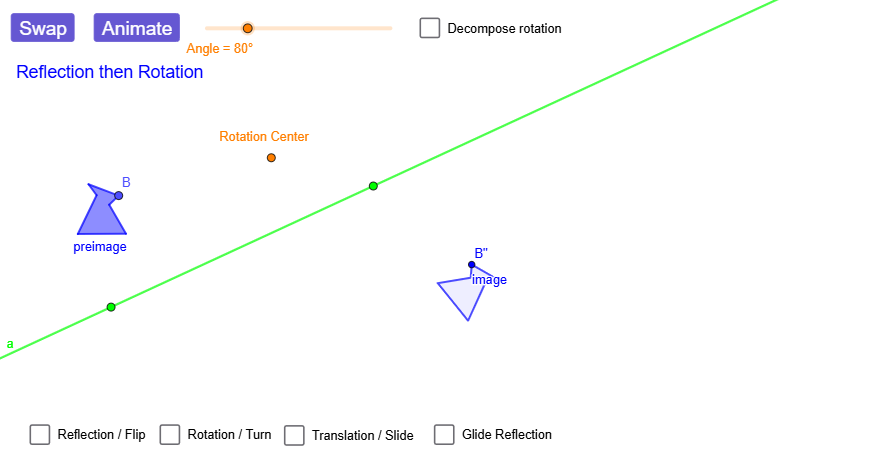
This example demonstrates a “Turn-Flip” (a rotation followed by a reflection) by showing how the composite transformation moves the vertices of a polygon and produces clear point-to-point correspondences. The key mathematics includes geometric transformations (rotation and mirror reflection as rigid motions), composition of transformations (and how translations/glides may appear in the setup), and the mapping between an original configuration (preimage) and its images. Construction highlights: using Point, Polygon, Vector, and Line to build the initial geometric configuration; applying Rotate and Mirror to generate reflected/rotated versions of points and objects; leveraging Translate and glide to express the composite motion; and employing Segment, Angle, and Intersect to draw connectors, measure angles, and locate key intersection points. The result is a visual before/after comparison (e.g., A’, B’, C’ and related segments) that emphasizes the geometric effect of the combined transformation. Suitable for middle/high school geometry learners and for classroom visualization or enrichment activities on transformation geometry.
GeoGebra Commands & Parameters
Point(Circle[A, 1.2851459061133876]) → BPolygon(A, B, C, D, E, F) → preimage, a_{1}, b_1, c_1, d, e, fVector(G, H) → VectorLine(I, J) → lineOfReflectionTranslate(A, Vector) → A'_{5}Translate(B, Vector) → B'_{5}Translate(C, Vector) → C'_{5}Translate(D, Vector) → D'_{5}Translate(E, Vector) → E'_{5}Translate(F, Vector) → F'_{5}Polygon(A'_{5}, B'_{5}, C'_{5}, D'_{5}, E'_{5}, F'_{5}) → translated, a', b', c', d', e', f'Mirror(A, lineOfReflection) → A'_{1}Mirror(B, lineOfReflection) → B'_{1}Mirror(C, lineOfReflection) → C'_{1}Mirror(D, lineOfReflection) → D'_{1}Mirror(E, lineOfReflection) → E'_{1}Mirror(F, lineOfReflection) → F'_{1}Polygon(A'_{1}, B'_{1}, C'_{1}, D'_{1}, E'_{1}, F'_{1}) → reflected, a'_{1}, b'_{1}, c'_{1}, d'_{1}, e'_{1}, f'_{1}Rotate(A, dummyRotationAngle, Center) → A'_{2}Rotate(B, dummyRotationAngle, Center) → B'_{2}Rotate(C, dummyRotationAngle, Center) → C'_{2}Rotate(D, dummyRotationAngle, Center) → D'_{2}Rotate(E, dummyRotationAngle, Center) → E'_{2}Rotate(F, dummyRotationAngle, Center) → F'_{2}Polygon(A'_{2}, B'_{2}, C'_{2}, D'_{2}, E'_{2}, F'_{2}) → rotated, a'_{2}, b'_{2}, c'_{2}, d'_{2}, e'_{2}, f'_{2}Line(K, lineOfReflection) → hPoint(h) → LVector(K, L) → Vector2Mirror(A, lineOfReflection) → A'_{3}Mirror(B, lineOfReflection) → B'_{3}Mirror(C, lineOfReflection) → C'_{3}Mirror(D, lineOfReflection) → D'_{3}Mirror(E, lineOfReflection) → E'_{3}Mirror(F, lineOfReflection) → F'_{3}Polygon(A'_{3}, B'_{3}, C'_{3}, D'_{3}, E'_{3}, F'_{3}) → intermediary, a'_{3}, b'_{3}, c'_{3}, d'_{3}, e'_{3}, f'_{3}Translate(A'_{3}, Vector2) → MTranslate(B'_{3}, Vector2) → NTranslate(C'_{3}, Vector2) → OTranslate(D'_{3}, Vector2) → PTranslate(E'_{3}, Vector2) → QTranslate(F'_{3}, Vector2) → RPolygon(M, N, O, P, Q, R) → image_{1}, m, n, o, p, q, rLine(S, T) → aRotate(preimageList, angleAnimator, rotationCenter) → RFanimRotListRotate(A, rotationAngle) → A'_{4}Rotate(C, rotationAngle) → C'_{4}Rotate(D, rotationAngle) → D'_{4}Rotate(E, rotationAngle) → E'_{4}Rotate(F, rotationAngle) → F'_{4}Rotate(A, rotationAngle, rotationCenter) → A'_{6}Rotate(C, rotationAngle, rotationCenter) → C'_{6}Rotate(D, rotationAngle, rotationCenter) → D'_{6}Rotate(E, rotationAngle, rotationCenter) → E'_{6}Rotate(F, rotationAngle, rotationCenter) → F'_{6}Mirror(A'_{6}, a) → WMirror(C'_{6}, a) → F_1Mirror(D'_{6}, a) → G_1Mirror(E'_{6}, a) → H_1Mirror(F'_{6}, a) → I_1Rotate(preimageList, rotationAngle, rotationCenter) → RFintermListMirror(RFintermList, a) → RFfinalListMirror(preimageList, a) → FRintermListRotate(FRintermList, rotationAngle, rotationCenter) → FRfinalListRotate(FRintermList, angleAnimator, rotationCenter) → FRanimRotListPolygon(FRanimFlipList) → FRanimFlipPolygon(FRanimRotList) → FRanimRotPolygon(FRintermList) → FRintermPolygon(RFanimRotList) → RFanimRotPolygon(RFintermList) → RFintermPolygon(RFanimFlipList) → RFanimFlipPolygon(RFfinalList) → RFfinalPolygon(FRfinalList) → imageSegment(rotationCenter, FRanimRotList(2)) → FRrotationSegmentSegment(rotationCenter, RFanimRotList(2)) → RFrotSegmentLine(rotationCenter, V) → bRotate(V, rotationAngle / 2, rotationCenter) → V'Angle(V, rotationCenter, V') → linesAngleLine(rotationCenter, V') → cRotate(b, pivotAngle1_{RefRot}, rotationCenter) → b'_{4}Intersect(b'_{4}, a) → Center_{ab}Rotate(a, pivotAngle2_{RefRot}, Center_{ab}) → a'_{4}Mirror(F, a'_{4}) → F'Mirror(E, a'_{4}) → E'Mirror(D, a'_{4}) → D'Mirror(C, a'_{4}) → C'Mirror(B, a'_{4}) → B'Mirror(A, a'_{4}) → A'Polygon(A', B', C', D', E', F') → preimage', g, i, j, k, l, sRotate(b'_{4}, pivotAngle2_{RefRot}, Center_{ab}) → tMirror(F', t) → F''Mirror(E', t) → E''Mirror(D', t) → D''Mirror(C', t) → C''Mirror(B', t) → B''Mirror(A', t) → A''Polygon(A'', B'', C'', D'', E'', F'') → preimage'', a'', b'', c'', d'', e'', f''Rotate(c, pivotAngle1_{RefRot}, rotationCenter) → c'_{4}Intersect(c, a) → Center_{ac}Rotate(a, pivotAngle1_{RotRef}, Center_{ac}) → a'_{5}Rotate(c, pivotAngle1_{RotRef}, Center_{ac}) → c'_{5}Intersect(b, c'_{5}) → Center_{bc}Rotate(b, pivotAngle2_{RotRef}, Center_{bc}) → b'_{5}Rotate(c'_{5}, pivotAngle2_{RotRef}, Center_{bc}) → f_1Mirror(A, b'_{5}) → A'_{7}Mirror(B, b'_{5}) → B'_{4}Mirror(C, b'_{5}) → C'_{7}Mirror(D, b'_{5}) → D'_{7}Mirror(E, b'_{5}) → E'_{7}Mirror(F, b'_{5}) → F'_{7}Polygon(A'_{7}, B'_{4}, C'_{7}, D'_{7}, E'_{7}, F'_{7}) → preimage'_{1}, a'_{7}, g_1, c'_{7}, d'_{7}, e'_{7}, f'_{7}Mirror(A'_{7}, f_1) → ZMirror(B'_{4}, f_1) → B_1Mirror(C'_{7}, f_1) → C_1Mirror(D'_{7}, f_1) → D_1Mirror(E'_{7}, f_1) → E_1Mirror(F'_{7}, f_1) → J_1Polygon(Z, B_1, C_1, D_1, E_1, J_1) → poly1, z_1, b_{2}, c_{2}, d_1, e_1, j_1
AI Drawing Prompt Reference
Draw a hexagon (formed by points A to F) and a reflection line (defined by points I and J). First, draw the original hexagon and the reflection line. Then, reflect the hexagon across the reflection line to obtain another hexagon. Next, rotate the reflected hexagon around a center by a certain angle to obtain the final figure. This process illustrates the combined transformation of rotation and reflection, highlighting the correspondence between the original and transformed figures.
The prompt above was compiled from the original drawing commands and is for reference only.