
Parallelograms: Quick Investigation with Transformations
Loading the math board and drawing, please wait…
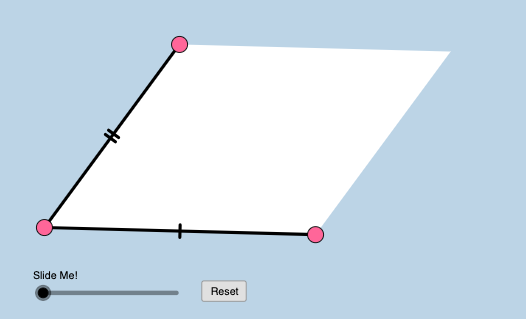
This example shows how to construct a parallelogram in GeoGebra and quickly investigate its geometric properties by comparing configurations created through transformations. It focuses on key concepts such as the parallelism of opposite sides, relationships between corresponding angles, and vector-based descriptions of side directions. Construction emphasizes practical GeoGebra tools: Line, Segment, and Polygon to build edges and the parallelogram; Slope to verify parallel lines via gradient checks; PointIn to place points consistently with respect to regions/constraints; Vector to model side directions and vector relationships; Translate to move vertices and generate corresponding points; and Dilate to apply scaling transformations for further structural comparison. The scene uses multiple related objects (e.g., original vertices and transformed vertices like A' and B', and several polygon variants poly1/poly2/poly3) plus an interactive control (button1) to support step-by-step exploration. Suitable for secondary geometry instruction, dynamic geometry practice, and learners interested in using vectors and transformations to justify parallelogram properties.
GeoGebra Commands & Parameters
Line(A, B) → aSlope(a) → mPointIn(c) → CLine(C, a) → eVector(A, B) → uTranslate(C, u) → C'Segment(A, B) → hSegment(A, C) → dPolygon(A, B, C') → poly1, c', a_1, b_1Polygon(A, C', C) → poly2, c_1, a_2, c'_1Dilate(A, If[0 < k ≤ 1, 1 - k, 0], C) → A'Vector(A, A') → vTranslate(A, v) → A'_1Translate(B, v) → B'Segment(A'_1, B') → h'Dilate(C, If[1 < k ≤ 2, 2 - k, 0], C') → C'_1Vector(C, C'_1) → wTranslate(A, w) → A'_2Translate(C, w) → C'_2Segment(A'_2, C'_2) → d'Polygon(A, B, C', C) → poly3, a_3, b_2, c'_2, c_2
AI Drawing Prompt Reference
Draw a parallelogram by first creating a base segment. Pick a point above the base and draw a line through it parallel to the base. Use a vector to represent the base's direction and length, then translate the upper point by this vector to get the fourth vertex. Connect all four vertices to form the parallelogramhol, and add one diagonal to split it into two triangles. Then apply a scaling transformation to one vertex, generating a new point, and connect related points to form new segments, showing the scaled figure. Finally, add the other diagonal to split the original parallelogram into two triangles, and apply another scaling transformation to generate a second set of new points and segments for comparison.
The prompt above was compiled from the original drawing commands and is for reference only.