
Interactive Quiz on Parallelogram Properties: Sides, Angles, and Diagonals
Loading the math board and drawing, please wait…
In collections
Parallelogramm und Raute: Eigenschaften und Konstruktionen
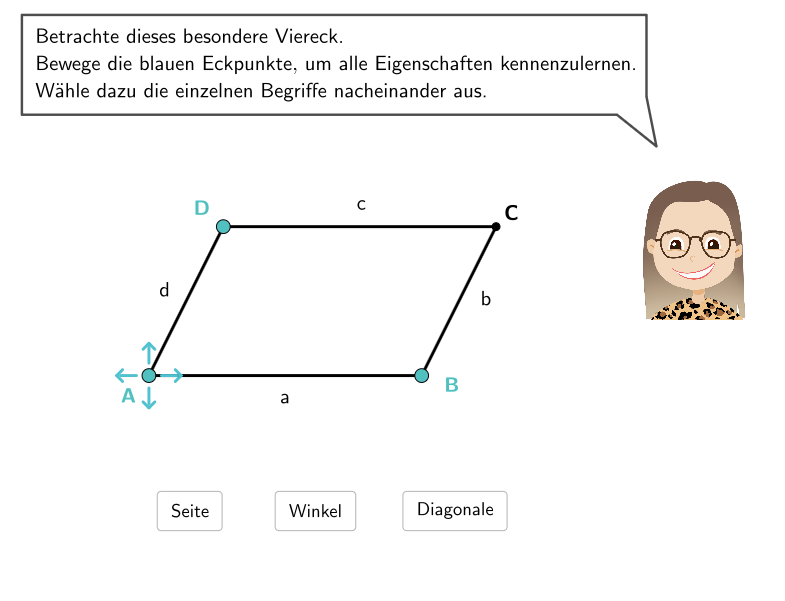
This GeoGebra lesson uses multiple-choice and open questions to guide students in identifying which properties hold for a parallelogram’s sides, angles, and diagonals. Key concepts include: side properties (opposite sides are equal in length and parallel), angle properties (adjacent angles are supplementary; opposite angles are equal), and diagonal-related checks (e.g., whether diagonals bisect each other or are perpendicular, depending on the specific option being tested). The construction and interactivity come from the listed GeoGebra commands and objects: Polygon and Point create the parallelogram; Segment and Vector build sides/diagonals; Angle is used to measure and display angle information; Rotate supports geometric repositioning; Textfield and SpeechBubbleRight present prompts and allow user input; If performs instant correctness checking; DropDown provides selectable answers. Objects such as showangles, showdiagonals, and showlengths control which geometric annotations are displayed. attemptCount together with input*/correct* records attempts and results. Suitable for grades 5–6 and for early geometry learning, review, or formative assessment.
GeoGebra Commands & Parameters
SelectedIndex(DropDown2) → input2SelectedIndex(DropDown1) → input1SelectedIndex(DropDown3) → input3SelectedIndex(DropDown4) → input4SelectedIndex(DropDown5) → input5SelectedIndex(DropDown7) → input7Polygon(R2, Midpoint[R3, R2], Midpoint[R2, R4], Midpoint[R1, R2]) → v2, l, m, n, pPointIn(v2) → APolygon(R3, Midpoint[R3, R4], Midpoint[R2, R4], Midpoint[R2, R3]) → v3, h, i, j, kPointIn(v3) → BPolygon(R1, Midpoint[R1, R2], Midpoint[R2, R4], Midpoint[R1, R4]) → v1, g, a, b, cPointIn(v1) → DPoint(Line[EP1, xAxis]) → EP2Polygon(R4, Midpoint[R1, R4], Midpoint[R2, R4], Midpoint[R3, R4]) → v4, q, r, s, tTextfield(input0) → Eingabefeld1Textfield(input00) → Eingabefeld2SpeechBubbleRight(E0, 12, 1.65) → Vieleck1Polygon(A, B, C, D) → l1, l1_{2}, l1_{3}, l1_{4}, l1_{5}SpeechBubbleRight(E1, 9.2, 1.1) → Vieleck2Point(Line[F, xAxis]) → GSpeechBubbleRight(E2, 11.2, 1.1) → Vieleck3If(Angle[B, A, D] ≤ 180°, Angle[B, A, D], Angle[D, A, B]) → αIf(Angle[A, B, C] ≤ 180°, Angle[A, B, C], Angle[C, B, A]) → βIf(Angle[B, C, D] ≤ 180°, Angle[B, C, D], Angle[D, C, B]) → γIf(Angle[C, D, A] ≤ 180°, Angle[C, D, A], Angle[A, D, C]) → δTextfield(input6) → Eingabefeld6SpeechBubbleRight(E3, 12.1, 1.1) → Vieleck4Segment(A, C) → eSegment(B, D) → fSpeechBubbleRight(E4, 12.8, 1.75) → Vieleck5If(α / ° - floor(α / °) < 0.5, floor(α / °), ceil(α / °)) → roundalphaIf(β / ° - floor(β / °) < 0.5, floor(β / °), ceil(β / °)) → roundbetaIf(δ / ° - floor(δ / °) < 0.5, floor(δ / °), ceil(δ / °)) → rounddeltaIf(γ / ° - floor(γ / °) < 0.5, floor(γ / °), ceil(γ / °)) → roundgammaVector(H, I) → vbirnePoint(Line[Q, xAxis]) → RSegment(EP4, EP1) → p4Segment(EP1, EP2) → p1Segment(EP2, EP3) → p2Segment(EP4, EP3) → p3Angle(Polygon[EP1, EP2, EP3, EP4]) → ε, ζ, η, θSegment(EP1, EP3) → e2Segment(EP2, EP4) → f2Rotate(Segment[ArrowCenter + (ArrowDistance, 0), ArrowCenter + (ArrowDistance + ArrowLength, 0)], ArrowAngle + ((1 - 1) * (360°) / ArrowNumber), ArrowCenter) → arrow1Rotate(Segment[ArrowCenter + (ArrowDistance, 0), ArrowCenter + (ArrowDistance + ArrowLength, 0)], ArrowAngle + ((2 - 1) * (360°) / ArrowNumber), ArrowCenter) → arrow2Rotate(Segment[ArrowCenter + (ArrowDistance, 0), ArrowCenter + (ArrowDistance + ArrowLength, 0)], ArrowAngle + ((3 - 1) * (360°) / ArrowNumber), ArrowCenter) → arrow3Rotate(Segment[ArrowCenter + (ArrowDistance, 0), ArrowCenter + (ArrowDistance + ArrowLength, 0)], ArrowAngle + ((4 - 1) * (360°) / ArrowNumber), ArrowCenter) → arrow4
AI Drawing Prompt Reference
Draw a parallelogram to illustrate its properties of sides, angles, and diagonals. Start by constructing the four sides of the parallelogram, ensuring opposite sides are parallel and equal in length. Then, measure and label the adjacent angles to show they are supplementary and opposite angles are equal. Next, draw the diagonals and check if they bisect each other. Finally, include interactive elements like dropdown menus and text fields for students to select and verify the properties of the parallelogram.
The prompt above was compiled from the original drawing commands and is for reference only.