
Constructing and Checking a Turn-Slide Transformation
Loading the math board and drawing, please wait…
In collections
Congruence Transformations
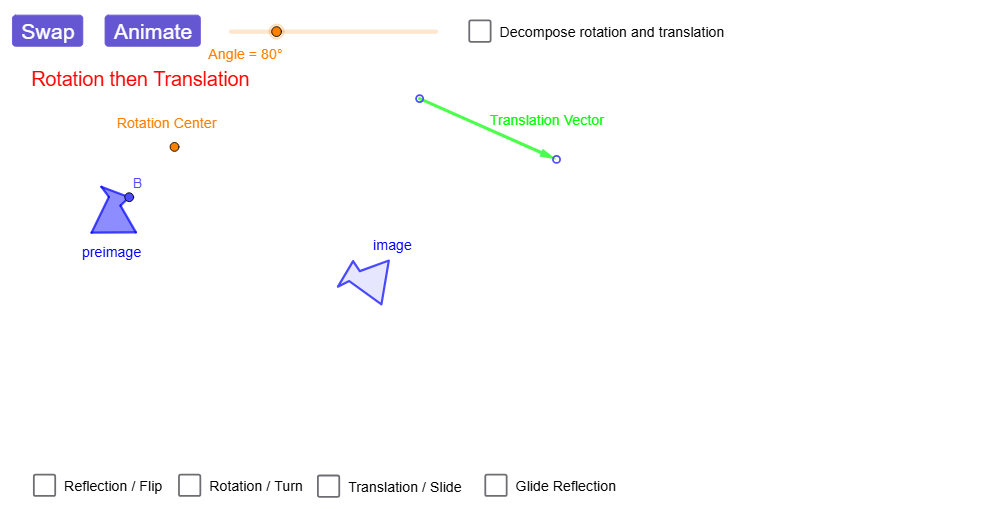
This example demonstrates a “turn-slide” (a composite rigid motion) by transforming a polygon through a controlled combination of rotation and translation, showing how the preimage and image are aligned under the transformation. The key ideas are plane isometries and composite transformations: rotate + translate (or an equivalent order), and how corresponding points, segments, and angles match after the motion. The construction uses GeoGebra commands Point, Polygon, Vector, Line, Translate, Mirror, Rotate, Segment, Angle, OrthogonalLine, Circle, and Intersect, building and tracking vertices (A, B, C, D, E, F and their primed images), auxiliary lines/vectors, and the rotation/translation operators that produce the final turn-slide image. It also supports verification via Angle and segment correspondences. Suitable for middle to high school geometry lessons and transformation-focused explorations, including interactive classroom demonstrations.
GeoGebra Commands & Parameters
Point(Circle[A, 1.2851459061133876]) → BPolygon(A, B, C, D, E, F) → preimage, a_{1}, b_1, c_1, d_1, e, fVector(G, H) → VectorLine(I, J) → lineOfReflectionTranslate(A, Vector) → A'_{5}Translate(B, Vector) → B'_{5}Translate(C, Vector) → C'_{5}Translate(D, Vector) → D'_{5}Translate(E, Vector) → E'_{5}Translate(F, Vector) → F'_{5}Polygon(A'_{5}, B'_{5}, C'_{5}, D'_{5}, E'_{5}, F'_{5}) → translated, a', b', c', d', e', f'Mirror(A, lineOfReflection) → A'_{1}Mirror(B, lineOfReflection) → B'_{1}Mirror(C, lineOfReflection) → C'_{1}Mirror(D, lineOfReflection) → D'_{1}Mirror(E, lineOfReflection) → E'_{1}Mirror(F, lineOfReflection) → F'_{1}Rotate(A, dummyRotationAngle, Center) → A'_{2}Rotate(B, dummyRotationAngle, Center) → B'_{2}Rotate(C, dummyRotationAngle, Center) → C'_{2}Rotate(D, dummyRotationAngle, Center) → D'_{2}Rotate(E, dummyRotationAngle, Center) → E'_{2}Rotate(F, dummyRotationAngle, Center) → F'_{2}Polygon(A'_{2}, B'_{2}, C'_{2}, D'_{2}, E'_{2}, F'_{2}) → rotated, a'_{2}, b'_{2}, c'_{2}, d'_{2}, e'_{2}, f'_{2}Line(K, lineOfReflection) → hPoint(h) → LVector(K, L) → Vector2Mirror(A, lineOfReflection) → A'_{3}Mirror(B, lineOfReflection) → B'_{3}Mirror(C, lineOfReflection) → C'_{3}Mirror(D, lineOfReflection) → D'_{3}Mirror(E, lineOfReflection) → E'_{3}Mirror(F, lineOfReflection) → F'_{3}Polygon(A'_{3}, B'_{3}, C'_{3}, D'_{3}, E'_{3}, F'_{3}) → intermediary, a'_{3}, b'_{3}, c'_{3}, d'_{3}, e'_{3}, f'_{3}Translate(A'_{3}, Vector2) → MTranslate(B'_{3}, Vector2) → NTranslate(C'_{3}, Vector2) → OTranslate(D'_{3}, Vector2) → PTranslate(E'_{3}, Vector2) → QTranslate(F'_{3}, Vector2) → RPolygon(M, N, O, P, Q, R) → image_{1}, m, n, o, p, q, rRotate(preimageList, angleAnimator, rotationCenter) → RTanimRotListRotate(A, rotationAngle) → A'_{4}Rotate(C, rotationAngle) → C'_{4}Rotate(D, rotationAngle) → D'_{4}Rotate(E, rotationAngle) → E'_{4}Rotate(F, rotationAngle) → F'_{4}Rotate(A, rotationAngle, rotationCenter) → A'_{6}Rotate(C, rotationAngle, rotationCenter) → C'_{6}Rotate(D, rotationAngle, rotationCenter) → D'_{6}Rotate(E, rotationAngle, rotationCenter) → E'_{6}Rotate(F, rotationAngle, rotationCenter) → F'_{6}Rotate(preimageList, rotationAngle, rotationCenter) → RTintermListPolygon(RTanimRotList) → RTanimRotPolygon(RTintermList) → RTintermSegment(rotationCenter, RTanimRotList(2)) → RFrotSegmentLine(rotationCenter, V) → aRotate(V, rotationAngle / 2, rotationCenter) → V'Angle(V, rotationCenter, V') → linesAngleLine(rotationCenter, V') → bVector(S, T) → translVectorOrthogonalLine(W, translVector, xOyPlane) → cCircle(W, abs(translVector) / 2) → kOrthogonalLine(W, c, xOyPlane) → iCircle(W, abs(translVector) / 2) → sIntersect(i, s, 2) → ZLine(Z, c) → dTranslate(RTinterm, translVector) → imageMirror(A, lineOfReflection) → A'Mirror(B, lineOfReflection) → B'Mirror(C, lineOfReflection) → C'Mirror(D, lineOfReflection) → D'Mirror(E, lineOfReflection) → E'Mirror(F, lineOfReflection) → F'Polygon(A', B', C', D', E', F') → preimage', l, t, a_{2}, f_1, g_1, h_1Polygon(RTanimTranslList) → RTanimTranslPolygon(TRanimTranslList) → TRanimTranslPolygon(TRintermList) → TRintermRotate(TRintermList, angleAnimator, rotationCenter) → TRanimRotListPolygon(TRanimRotList) → TRanimRotSegment(rotationCenter, TRanimRotList(1)) → rotSegmentRotate(TRinterm, rotationAngle, rotationCenter) → TRinterm'Translate(A, translVector) → A'_{7}Translate(C, translVector) → C'_{7}Translate(D, translVector) → D'_{7}Translate(E, translVector) → E'_{7}Translate(F, translVector) → F'_{7}Mirror(A, c) → A'_{8}Mirror(B, c) → B'_{4}Mirror(C, c) → C'_{8}Mirror(D, c) → D'_{8}Mirror(E, c) → E'_{8}Mirror(F, c) → F'_{8}Polygon(A'_{8}, B'_{4}, C'_{8}, D'_{8}, E'_{8}, F'_{8}) → preimage'_{1}, a'_{8}, b'_{4}, c'_{8}, d'_{8}, e'_{8}, f'_{8}Mirror(preimage'_{1}, d) → poly1Mirror(poly1, a) → poly1'Mirror(poly1', b) → poly1''Mirror(A, a) → A'_{9}Mirror(B, a) → B'_{6}Mirror(C, a) → C'_{9}Mirror(D, a) → D'_{9}Mirror(E, a) → E'_{9}Mirror(F, a) → F'_{9}Polygon(A'_{9}, B'_{6}, C'_{9}, D'_{9}, E'_{9}, F'_{9}) → preimage'_{2}, a'_{9}, b'_{6}, c'_{9}, d'_{9}, e'_{9}, f'_{9}Mirror(A'_{9}, b) → B_1Mirror(B'_{6}, b) → C_1Mirror(C'_{9}, b) → D_1Mirror(D'_{9}, b) → E_1Mirror(E'_{9}, b) → F_1Mirror(F'_{9}, b) → G_1Polygon(B_1, C_1, D_1, E_1, F_1, G_1) → poly2, g, j, d_{2}, e_1, i_1, j_1Mirror(B_1, c) → H_1Mirror(C_1, c) → I_1Mirror(D_1, c) → J_1Mirror(E_1, c) → K_1Mirror(F_1, c) → L_1Mirror(G_1, c) → M_1Polygon(H_1, I_1, J_1, K_1, L_1, M_1) → poly2', k_1, l_1, m_1, n_1, p_1, q_1Mirror(poly2', d) → poly2''
AI Drawing Prompt Reference
Draw a polygon as the original shape, then add a line as the reflection axis and a vector for translation. First translate the polygon along the vector to get a translated copy, then reflect it across the axis to get a mirrored copy. Next, rotate the original polygon about a center point by an angle to get a rotated copy. Finally, reflect the original polygon across the axis and then translate the reflected result by another vector to obtain the final composite image. Use dashed lines or different colors to mark corresponding points, sides, and angles, illustrating the combined rotation and translation rigid motion.
The prompt above was compiled from the original drawing commands and is for reference only.