
What is a Turn-Turn? (Composing Two Rotations)
Loading the math board and drawing, please wait…
In collections
Congruence Transformations
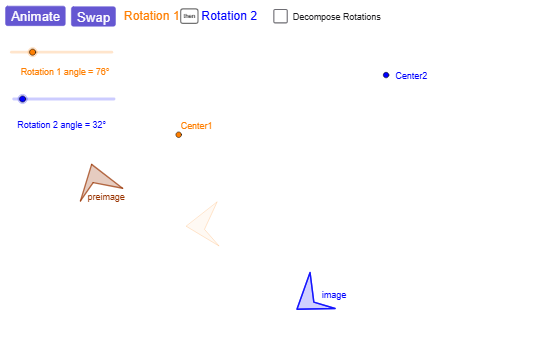
This GeoGebra example demonstrates how combining two rotations (a “turn-turn” composition) produces a predictable overall transformation. By dynamically changing rotation parameters, the construction shows how the final position of images of points depends on the two rotation centers and the two rotation angles, making the equivalence of the composite motion visually clear. Key concepts include geometric transformations—especially rotation—angle relationships, and the use of corresponding points/segments to track how the mapping evolves. Construction details: it uses Line to set reference geometry, Rotate to apply two rotations to points, and Angle to label and control angles (such as α, β, and resulting angles like γ, δ). Points and segments (including rotation centers Center1/Center2 and named points with their images, e.g., A/B/C and A′/B′/C′) are created with Point and Segment for clear correspondence. Polygon is used for structured visualization, while If enables conditional choices in the construction. Mirror is included for auxiliary geometric construction where needed. The example further employs animator and animator1/animator2 together with lists like R1R2rot1List and R1R2rot2List (and their animated variants) to animate the composite rotation and let learners explore multiple parameter settings. Suitable for high school geometry, transformation teaching, and dynamic geometry learning.
GeoGebra Commands & Parameters
Line(Center1, A) → aLine(Center2, B) → cRotate(A, α / 2, Center1) → A'Angle(A, Center1, A') → γLine(Center1, A') → bRotate(B, β / 2, Center2) → B'Angle(B, Center2, B') → δLine(Center2, B') → dPolygon(C, D, E, F) → preimage, c_1, d_1, e, fRotate(C, α, Center1) → C'Rotate(D, α, Center1) → D'Rotate(E, α, Center1) → E'Rotate(F, α, Center1) → F'Rotate(preimageList, α, Center1) → R1R2rot1ListPolygon(R1R2rot1List) → R1R2rot1Rotate(R1R2rot1List, β, Center2) → R1R2rot2ListPolygon(R1R2rot2List) → R1R2rot2If(animator ≤ 1, animator, 0) → animator1If(animator ≥ 1, animator - 1, 0) → animator2Rotate(preimageList, (animator1 * α), Center1) → AnimR1R2rot1ListPoint(AnimR1R2rot1List) → GRotate(R1R2rot1List, (animator2 * β), Center2) → AnimR1R2rot2ListSegment(AnimR1R2rot2List(1), Center2) → hSegment(Center1, AnimR1R2rot1List(1)) → gPolygon(AnimR1R2rot2List) → AnimR1R2rot2Polygon(AnimR1R2rot1List) → AnimR1R2rot1Angle(preimageList(1), Center1, AnimR1R2rot1List(1)) → Angle1Angle(R1R2rot1List(1), Center2, AnimR1R2rot2List(1)) → AnimAngle2Segment(Center1, preimageList(1)) → AnimSegmentFixedSegment(Center2, R1R2rot1List(1)) → AnimSegmentR2FixedRotate(preimageList, β, Center2) → R2R1rot1ListPolygon(R2R1rot1List) → R2R1rot1Rotate(R2R1rot1List, α, Center1) → R2R1rot2ListPolygon(R2R1rot2List) → R2R1rot2Rotate(preimageList, (animator1 * β), Center2) → AnimR2R1rot1ListRotate(R2R1rot1List, (animator2 * α), Center1) → AnimR2R1rot2ListPolygon(AnimR2R1rot1List) → AnimR2R1rot1Polygon(AnimR2R1rot2List) → AnimR2R1rot2Segment(Center2, preimageList(1)) → SegmentR2R1rot1FixedSegment(Center2, AnimR2R1rot1List(1)) → SegmentR2R1rot1MovingAngle(preimageList(1), Center2, AnimR2R1rot1List(1)) → AnimR2R1angle1Segment(Center1, R2R1rot1List(1)) → SegmentR2R1rot2FixedSegment(Center1, AnimR2R1rot2List(1)) → SegmentR2R1rot2MovingAngle(R2R1rot1List(1), Center1, AnimR2R1rot2List(1)) → AnimR2R1angle2Mirror(C, c) → C'_{1}Mirror(D, c) → D'_{1}Mirror(E, c) → E'_{1}Mirror(F, c) → F'_{1}Polygon(C'_{1}, D'_{1}, E'_{1}, F'_{1}) → preimage', c'_{1}, d'_{1}, e'_{1}, f'_{1}Mirror(R2R1rot1, a) → R2R1rot1'Mirror(C, a) → C'_{2}Mirror(D, a) → D'_{2}Mirror(E, a) → E'_{2}Mirror(F, a) → F'_{2}Polygon(C'_{2}, D'_{2}, E'_{2}, F'_{2}) → preimage'_{1}, c'_{2}, d'_{2}, e'_{2}, f'_{2}Mirror(R1R2rot1, c) → R1R2rot1'
AI Drawing Prompt Reference
Create a dynamic geometry figure showing the composition of two rotations. Draw two rotation centers and connect each to a reference point with a segment. Rotate one point about the first center and label the angle; rotate another point about the second center and label its angle. Construct a quadrilateral as the original shape. Rotate the whole quadrilateral about the first center, then rotate the resulting image about the second center to get the composite image. Also show the reverse order (rotate about the second center first, then the first) for comparison. Use sliders to animate the two rotation angles, displaying intermediate steps with connecting segments and angles, so the difference between the two orders is visually clear.
The prompt above was compiled from the original drawing commands and is for reference only.