
Constructing Supplementary Angles with Angle Bisectors
Loading the math board and drawing, please wait…
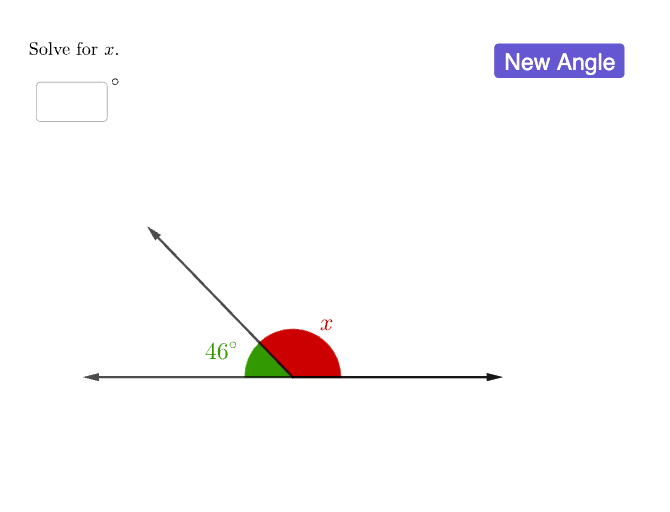
This example demonstrates how to construct and verify supplementary angle relationships in a dynamic geometry setting: two rays form angles whose measures sum to 180°, and the construction computes and displays the relevant angles and their status. The main mathematical concepts are supplementary angles, angle measurement, conditional logic, and the role of angle bisectors in geometric construction. Construction highlights in GeoGebra include using Intersect and Point to define the vertex and key intersection points (e.g., objects like A, B, C and angle labels such as α, β, γ, δ), Vector to represent ray directions (u, v, w), Rotate to generate rotated ray configurations, and Angle to measure and display angle values. Textfield and text objects are used to annotate angles, AngularBisector is applied to construct bisectors, and If provides conditional display/verification of the supplementary condition. InputBox and button controls (button1, button2) support switching scenarios or inputs. Suitable for middle/high school geometry lessons, dynamic geometry practice, and interactive classroom demonstrations.
GeoGebra Commands & Parameters
Intersect(xAxis, yAxis) → APoint(xAxis) → BVector(A, B) → uPoint(xAxis) → CVector(A, C) → vRotate(B, (-α), A) → B'Angle(B', A, B) → βVector(A, B') → wTextfield(D) → InputBox1Rotate(C, ρ, A) → C'Angle(C, A, B') → δVector(A, C') → aAngle(C, A, C') → εAngularBisector(B', A, B) → fPoint(f) → EAngularBisector(B', A, C) → gPoint(g) → FIf(γ ≟ ans, "Correct!", "Try again.") → text4
AI Drawing Prompt Reference
On a coordinate plane, place a vertex at the originasi. From the horizontal axis, select two points and draw two rays from the origin to them, forming two angles. Rotate one of the rays around the origin by a certain angle to create a new ray, and measure the angles between the original and rotated rays and the other ray. Construct another ray to form a third angle. Draw angle bisectors for two of the angles and place points on them. Provide an input box for entering an angle value; the system checks if it equals one of the measured angles and displays 'Correct!' or 'Try again.' The figure demonstrates supplementary angle relationships.
The prompt above was compiled from the original drawing commands and is for reference only.