
No-Pivot Turn-Flip: Rotation and Reflection Combined
Loading the math board and drawing, please wait…
In collections
Congruence Transformations
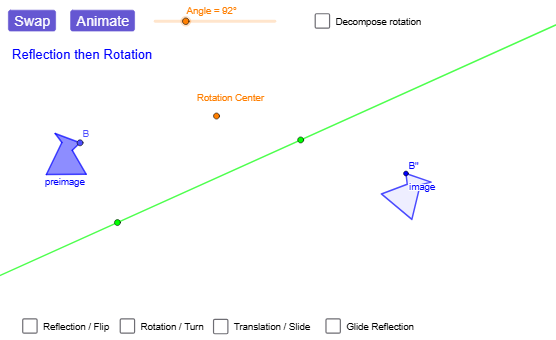
This GeoGebra example demonstrates what happens when you combine a rotation with a reflection—producing a “turn-flip” style transformation on a planar figure. It focuses on the geometric relationship between the original polygon and its transformed image, emphasizing Euclidean transformation composition. Key ideas include rigid motions, the reflection across a line (Mirror), rotation about a center (Rotate), and how corresponding points (e.g., A' , B' , C' …) are obtained and tracked under the composite map. Construction-wise, the model uses Point, Polygon, Segment, and Line to build the preimage geometry; Angle is used to control or display the rotation angle; Rotate and Mirror implement the two fundamental transformations, with a line of reflection defined by a Line object. Additional commands such as Translate, Vector, and the overall transform-object workflow help assemble the construction chain and visualize the final image after the combined rotation-reflection effect. Suitable for middle to early university geometry, interactive learning, and teaching transformation properties via direct manipulation.
GeoGebra Commands & Parameters
Point(Circle[A, 1.2851459061133876]) → BPolygon(A, B, C, D, E, F) → preimage, a, b, c, d, e, fVector(G, H) → VectorLine(I, J) → lineOfReflectionTranslate(A, Vector) → A'_{5}Translate(B, Vector) → B'_{5}Translate(C, Vector) → C'_{5}Translate(D, Vector) → D'_{5}Translate(E, Vector) → E'_{5}Translate(F, Vector) → F'_{5}Polygon(A'_{5}, B'_{5}, C'_{5}, D'_{5}, E'_{5}, F'_{5}) → translated, a', b', c', d', e', f'Mirror(A, lineOfReflection) → A'_{1}Mirror(B, lineOfReflection) → B'_{1}Mirror(C, lineOfReflection) → C'_{1}Mirror(D, lineOfReflection) → D'_{1}Mirror(E, lineOfReflection) → E'_{1}Mirror(F, lineOfReflection) → F'_{1}Polygon(A'_{1}, B'_{1}, C'_{1}, D'_{1}, E'_{1}, F'_{1}) → reflected, a'_{1}, b'_{1}, c'_{1}, d'_{1}, e'_{1}, f'_{1}Rotate(A, α, Center) → A'_{2}Rotate(B, α, Center) → B'_{2}Rotate(C, α, Center) → C'_{2}Rotate(D, α, Center) → D'_{2}Rotate(E, α, Center) → E'_{2}Rotate(F, α, Center) → F'_{2}Polygon(A'_{2}, B'_{2}, C'_{2}, D'_{2}, E'_{2}, F'_{2}) → rotated, a'_{2}, b'_{2}, c'_{2}, d'_{2}, e'_{2}, f'_{2}Line(K, lineOfReflection) → hPoint(h) → LVector(K, L) → Vector2Mirror(A, lineOfReflection) → A'_{3}Mirror(B, lineOfReflection) → B'_{3}Mirror(C, lineOfReflection) → C'_{3}Mirror(D, lineOfReflection) → D'_{3}Mirror(E, lineOfReflection) → E'_{3}Mirror(F, lineOfReflection) → F'_{3}Polygon(A'_{3}, B'_{3}, C'_{3}, D'_{3}, E'_{3}, F'_{3}) → intermediary, a'_{3}, b'_{3}, c'_{3}, d'_{3}, e'_{3}, f'_{3}Translate(A'_{3}, Vector2) → MTranslate(B'_{3}, Vector2) → NTranslate(C'_{3}, Vector2) → OTranslate(D'_{3}, Vector2) → PTranslate(E'_{3}, Vector2) → QTranslate(F'_{3}, Vector2) → RPolygon(M, N, O, P, Q, R) → image_{1}, m, n, o, p, q, rLine(S, T) → gRotate(preimageList, angleAnimator, rotationCenter) → RFanimRotListRotate(A, rotationAngle) → A'_{4}Rotate(C, rotationAngle) → C'_{4}Rotate(D, rotationAngle) → D'_{4}Rotate(E, rotationAngle) → E'_{4}Rotate(F, rotationAngle) → F'_{4}Rotate(A, rotationAngle, rotationCenter) → A'_{6}Rotate(C, rotationAngle, rotationCenter) → C'_{6}Rotate(D, rotationAngle, rotationCenter) → D'_{6}Rotate(E, rotationAngle, rotationCenter) → E'_{6}Rotate(F, rotationAngle, rotationCenter) → F'_{6}Mirror(A'_{6}, g) → WMirror(C'_{6}, g) → F_1Mirror(D'_{6}, g) → G_1Mirror(E'_{6}, g) → H_1Mirror(F'_{6}, g) → I_1Rotate(preimageList, rotationAngle, rotationCenter) → RFintermListMirror(RFintermList, g) → RFfinalListMirror(preimageList, g) → FRintermListRotate(FRintermList, rotationAngle, rotationCenter) → FRfinalListRotate(FRintermList, angleAnimator, rotationCenter) → FRanimRotListPolygon(FRanimFlipList) → FRanimFlipPolygon(FRanimRotList) → FRanimRotPolygon(FRintermList) → FRintermPolygon(RFanimRotList) → RFanimRotPolygon(RFintermList) → RFintermPolygon(RFanimFlipList) → RFanimFlipPolygon(RFfinalList) → RFfinalPolygon(FRfinalList) → imageSegment(rotationCenter, FRanimRotList(2)) → FRrotationSegmentSegment(rotationCenter, RFanimRotList(2)) → RFrotSegmentLine(rotationCenter, V) → iRotate(V, rotationAngle / 2, rotationCenter) → V'Angle(V, rotationCenter, V') → βLine(rotationCenter, V') → line2
AI Drawing Prompt Reference
Draw a hexagon along with multiple transformed images, including the original polygon, a line of reflection, a rotation center, and an adjustable angle. Create a hexagon as the base figure, draw a line as the axis of reflection, and specify a rotation center with an angle value. Sequentially show: the translated polygon, the reflected polygon, the rotated polygon, and the final image obtained by reflecting then translating. Use the adjustable angle to control rotation, demonstrating the combined rotation and reflection transformation and how corresponding points change.
The prompt above was compiled from the original drawing commands and is for reference only.