
Quiz: Identify Opposite, Adjacent & Hypotenuse in a Right Triangle
Loading the math board and drawing, please wait…
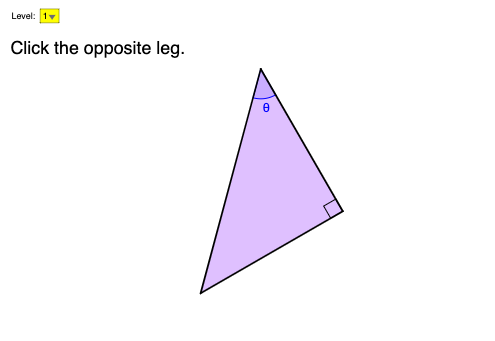
This interactive GeoGebra example is a quiz that trains learners to correctly identify the opposite, adjacent, and hypotenuse sides of a right triangle relative to a chosen angle θ, with immediate feedback (correct/incorrect) and progression through multiple questions. Key concepts include right-triangle side relationships (opposite vs. adjacent legs, and hypotenuse), angle notation and measurement, and the geometric foundation behind trigonometric ratios (sin/cos/tan). Construction and interaction use Polygon to build the triangle (poly1), Angle to define and display θ and related angles (e.g., α), Centroid for placement/annotation support, RandomElement to vary the problem setup, If to implement answer checking logic, UnitVector and SelectedElement to connect the chosen direction/angle with selectable triangle sides, and UI elements such as buttonNext/buttonCheck1, textTheta, and feedback graphics (picCorrect/picWrong) plus language/level controls. Suitable for middle school through high school students and as a preparatory activity before deeper trigonometry.
GeoGebra Commands & Parameters
Polygon(O, A, B) → poly1, sideA, sideH, sideOAngle(A, O, B) → αAngle(O, A, B) → thetaCentroid(poly1) → PRandomElement({"sin", "cos", "tan"}) → ratio, "cos"RandomElement({"o", "a", "h"}) → qtype1, "o"If(lang ≟ 1, "斜邊", "hypotenuse") → textSideHUnitVector(Vector[(0, 0, Vector[O, A] ⊗ Vector[O, P])] ⊗ Vector[A, O]) → uUnitVector(Vector[(0, 0, Vector[B, O] ⊗ Vector[B, P])] ⊗ Vector[O, B]) → vUnitVector(Vector[(0, 0, Vector[A, B] ⊗ Vector[A, P])] ⊗ Vector[B, A]) → wRandomElement({"soh", "cah", "toa"}) → qtype2, "soh"SelectedElement(listLevel) → levelIf(lang ≟ 1, "對邊", "opposite leg") → textSideOIf(lang ≟ 1, "鄰邊", "adjacent leg") → textSideA
AI Drawing Prompt Reference
Draw a right triangle with a right angle at point O, and two legs OA and OB, and hypotenuse AB. Use the Polygon command to construct the triangle, then use the Angle command to label angles α and θ. Choose a point P inside the triangle as a reference point, and use the UnitVector command to label three unit vectors u, v, and w, corresponding to the directions of OA, OB, and AB. Label the opposite, adjacent, and hypotenuse sides based on the randomly selected type, and provide the corresponding Chinese descriptions.
The prompt above was compiled from the original drawing commands and is for reference only.