
Cosine Theorem Explorer: Dynamic Links Between Sides and Angles
Loading the math board and drawing, please wait…
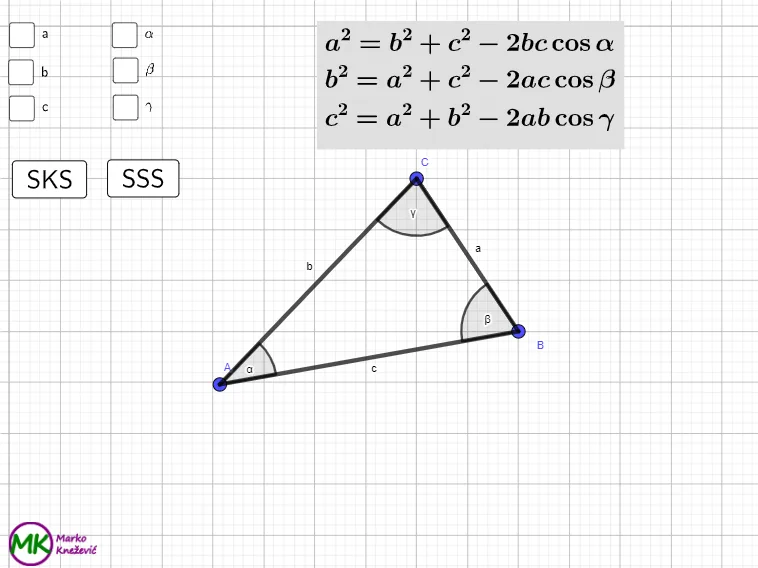
This GeoGebra example dynamically demonstrates the cosine theorem by constructing a triangle and showing how the three side lengths relate to the included angle. It focuses on core ideas from trigonometry—especially the cosine function and its geometric meaning in triangles. Key concepts include translating an angle into a side-length relationship and observing how those quantities change when parameters are varied. Construction uses GeoGebra commands such as Polygon to form the triangle, Angle to define/measure the included angle, Line and OrthogonalLine for auxiliary and perpendicular constructions, Point and Intersect to locate critical vertices and intersection points, and Random together with parameter lists (e.g., listAngle, listSide) to generate interactive configurations. Text/LaTeX objects present computed values and the underlying formula, while buttons/controls manage the animation and workflow. Suitable for secondary school learners through early university students, and for teaching or self-study of trigonometric geometry.
GeoGebra Commands & Parameters
Polygon(A, B, C) → t1, c, a, bAngle(B, A, C) → αAngle(C, B, A) → βAngle(A, C, B) → γRandom(1, 3) → randSideRandom(1, 3) → randAngleLaTeX(a, true, true) → text1LaTeX(b, true, true) → text2LaTeX(c, true, true) → text3LaTeX(α, true, true) → text4LaTeX(β, true, true) → text5LaTeX(γ, true, true) → text6Line(I, J) → pOrthogonalLine(Q, p) → qOrthogonalLine(R, p) → rLine(H, I) → sPoint(s) → SOrthogonalLine(S, s) → tPoint(s) → TOrthogonalLine(T, s) → f_1Point(s) → UOrthogonalLine(U, s) → g_1Point(s) → VOrthogonalLine(V, s) → h_1Point(s) → WOrthogonalLine(W, s) → i_1Point(s) → B_1OrthogonalLine(B_1, s) → j_1Point(s) → C_1OrthogonalLine(C_1, s) → k_1Point(s) → D_1OrthogonalLine(D_1, s) → l_1Line(J, K) → m_1Intersect(q, t) → E_1Intersect(r, t) → F_1Intersect(t, m_1) → G_1Intersect(q, f_1) → H_1Intersect(q, g_1) → I_1Intersect(q, h_1) → J_1Intersect(q, i_1) → K_1Intersect(q, j_1) → L_1Intersect(q, k_1) → M_1Intersect(q, l_1) → N_1Intersect(p, q) → O_1Intersect(r, f_1) → P_1Intersect(r, g_1) → Q_1Intersect(r, h_1) → R_1Intersect(r, i_1) → S_1Intersect(r, j_1) → T_1Intersect(r, k_1) → U_1Intersect(r, l_1) → V_1Intersect(f_1, m_1) → W_1Intersect(g_1, m_1) → Z_1Intersect(h_1, m_1) → A_2Intersect(i_1, m_1) → B_2Intersect(j_1, m_1) → C_2Intersect(k_1, m_1) → D_2Intersect(l_1, m_1) → E_2Intersect(p, r) → F_2Polygon(H, S, E_1, Q) → squareA_{1}, h_2, s_1, e_1, q_1Polygon(H_1, I_1, Q_1, P_1) → squareA_{2}, n_1, p_1, r_1, t_1Polygon(P_1, Q_1, Z_1, W_1) → squareA_{3}, a_1, b_1, z_1, w_1Polygon(T, U, I_1, H_1) → squareB_{1}, t_2, u, c_1, d_1Polygon(B_1, C_1, M_1, L_1) → squareB_{2}, f_2, g_2, i_2, j_2Polygon(Q, E_1, F_1, R) → squareB_{3}, q_2, k_2, l_2, r_2Polygon(R_1, S_1, B_2, A_2) → squareB_{4}, m_2, n_2, b_2, a_2Polygon(L_1, M_1, U_1, T_1) → squareA_{4}, p_2, s_2, u_1, c_2Polygon(V, W, K_1, J_1) → squareC_{1}, v, w, d_2, e_2Polygon(C_1, D_1, N_1, M_1) → squareC_{2}, f_3, g_3, h_3, i_3Polygon(J_1, K_1, S_1, R_1) → squareC_{3}, j_3, k_3, l_3, m_3Polygon(R, F_1, G_1, K) → squareC_{4}, r_3, n_3, p_3, k_4Polygon(D_1, I, O_1, N_1) → squareAlpha, q_3, i_4, o_1, s_3Polygon(N_1, O_1, F_2, V_1) → squareBeta, t_3, a_3, b_3, v_1Polygon(V_1, F_2, J, E_2) → squareGamma, c_3, d_3, j_4, e_3Polygon(T_1, U_1, D_2, C_2) → squareA, f_4, g_4, h_4, l_4Polygon(U_1, V_1, E_2, D_2) → squareB, m_4, n_4, p_4, q_4Polygon(M_1, N_1, V_1, U_1) → squareC, r_4, s_4, t_4, a_4
AI Drawing Prompt Reference
Draw a triangle with three labeled vertices and mark the three interior angles: form angle α at vertex A (between the two sides meeting at A), angle β at vertex B, and angle γ at vertex C. Display dynamic text showing the side lengths and the three angle measures (α, β, γ). Construct a reference line determined by two of the triangle’s vertices, then draw several lines perpendicular to this reference line through selected auxiliary points. Compute intersection points among these perpendicular lines and the reference line to place a set of supporting points. Connect some of these supporting points to create additional lines, and continue taking intersections between the new lines and the perpendicular/reference lines to complete a structured configuration for exploring how sides and included angles relate.
The prompt above was compiled from the original drawing commands and is for reference only.