
Geometric Demonstration of the Law of Sines in a Triangle
Loading the math board and drawing, please wait…
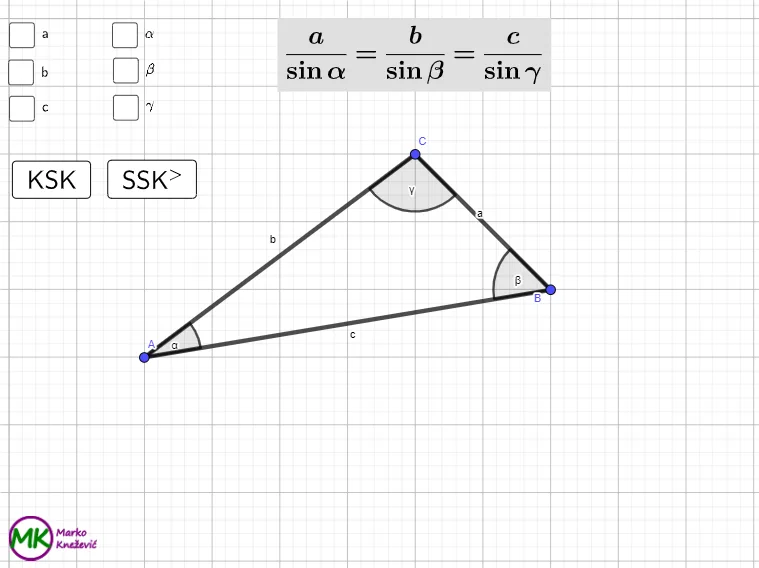
This GeoGebra example interactively demonstrates the Law of Sines: in any triangle, each side is proportional to the sine of its opposite angle. It focuses on the geometric relationship between angles and side lengths using trigonometric functions (sin) as the bridge between measurement and algebraic proportions. Construction highlights include building a triangle with Polygon, marking and measuring key angles with Angle, creating segments with Segment, computing intersection points via Intersect, and using Midpoint to support auxiliary constructions. Random plus parameters (e.g., Random-driven side/angle generation) allows generating multiple triangle configurations, while LaTeX-rendered text (text1–text7) and lists (listAngle, listSide) collect and display the computed angles and sides. Sliders/buttons (button1, button2, cnt) enable repeated trials and dynamic verification. Suitable for middle/high school learners and for teaching or self-study of trigonometry and triangle congruence/proportion reasoning.
GeoGebra Commands & Parameters
Polygon(A, B, C) → t1, c, a, bAngle(B, A, C) → αAngle(C, B, A) → βAngle(A, C, B) → γRandom(1, 3) → randSideRandom(1, 3) → randAngleLaTeX(a, true, true) → text1LaTeX(b, true, true) → text2LaTeX(c, true, true) → text3LaTeX(α, true, true) → text4LaTeX(β, true, true) → text5LaTeX(γ, true, true) → text6Polygon(D, E, F, G) → q1, d_1, e_1, f_1, g_1Segment(D, E) → jSegment(E, F) → kSegment(F, G) → lSegment(G, D) → mMidpoint(d_1) → HMidpoint(d_1) → IMidpoint(H, D) → JMidpoint(H, E) → KMidpoint(E, F) → LMidpoint(F, G) → MMidpoint(G, M) → NMidpoint(M, F) → OMidpoint(G, D) → PSegment(P, L) → nSegment(N, J) → pSegment(H, M) → qSegment(K, O) → rIntersect(n, p) → QIntersect(n, q) → RSegment(Q, R) → sIntersect(n, r) → SPolygon(D, J, Q, P) → squareA, d_2, j_1, q_1, p_1Midpoint(J, H) → TMidpoint(Q, R) → UMidpoint(H, K) → VMidpoint(R, S) → WPolygon(T, V, W, U) → squareB, t, v, w, uPolygon(K, E, L, S) → squareC, k_1, e_2, l_1, s_1Polygon(G, P, Q, N) → squareSINA, g_2, p_2, q_2, n_1Midpoint(M, N) → ZMidpoint(O, M) → A_1Polygon(U, W, A_1, Z) → squareSINB, u_1, w_1, a_1, z_1Polygon(S, L, F, O) → squareSINC, s_2, l_2, f_2, o
AI Drawing Prompt Reference
Draw a triangle with labeled angles and sides to demonstrate the Law of Sines, showing the proportionality between each side and the sine of its opposite angle. Randomly generate different triangle sizes and angles, using colored squares to represent the sine of each angle, where the area of each square is proportional to the sine value. Adjust the triangle dynamically to verify the theorem.
The prompt above was compiled from the original drawing commands and is for reference only.