
Opposite, Adjacent, and Hypotenuse in a Right Triangle
Loading the math board and drawing, please wait…
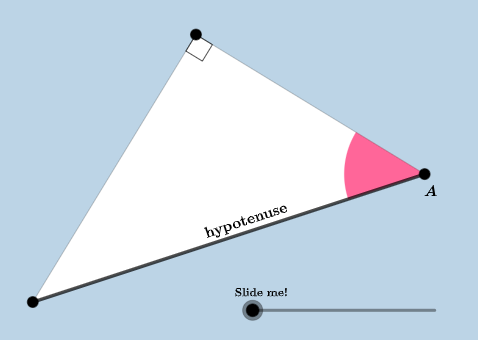
This GeoGebra example demonstrates how, in a right triangle, a chosen acute angle determines the positions of the opposite side, adjacent side, and hypotenuse. It helps learners connect geometric labeling directly to the meaning of trigonometric ratios (sine and cosine) through clear visual angle-and-side correspondences. Key concepts include right triangles, the opposite/adjacent/hypotenuse relationship relative to an angle, and angle identification for trig interpretation. Construction-wise, it uses geometric building blocks such as Point and Segment to place vertices and edges, OrthogonalLine and Polygon to establish the right-angle triangle, Angle to create and display the relevant angle measures (e.g., labels for hypotenuse-related and leg-related angles), and Midpoint along with Circle, Intersect, and CircleSector for auxiliary constructions that support the visual emphasis. RotateText is used to position explanatory text. The resulting interactive diagram, with multiple labeled points and text objects, is well suited for middle- to high-school instruction on right-triangle geometry and the introductory use of trigonometry, as well as classroom demonstrations and self-study.
GeoGebra Commands & Parameters
Segment(A, B_{1}) → fOrthogonalLine(B_{1}, f) → gPoint(g) → BSegment(A, B) → hSegment(B, B_{1}) → iAngle(B, B_{1}, A) → αMidpoint(f) → CMidpoint(i) → DMidpoint(h) → ERotateText(text3, hypangle) → text8RotateText(text7, iangle) → text10RotateText(text6, iangle) → text11RotateText(text4, fangle) → text9RotateText(text5, fangle) → text12Polygon(A, B_{1}, B) → t1, b, a, b_{1}Min(f, i) → cCircle(A, (0.3 * c)) → dCircle(B, (0.3 * c)) → eIntersect(d, f, 1) → FIntersect(d, h, 1) → GIntersect(e, h, 1) → HIntersect(e, i, 1) → ICircleSector(A, F, G) → kCircleSector(B, H, I) → p
AI Drawing Prompt Reference
Draw a right triangle and label one acute angle, clearly showing the opposite side, adjacent side, and hypotenuse relative to the chosen angle. Use dynamic elements to demonstrate how the angle determines the position of these sides. Include auxiliary circles and sectors within the triangle, and mark the midpoints of key segments for a clear visual representation of the sine and cosine trigonometric ratios.
The prompt above was compiled from the original drawing commands and is for reference only.