
Geometric Meanings of Sine, Cosine, and Tangent in a Right Triangle
Loading the math board and drawing, please wait…
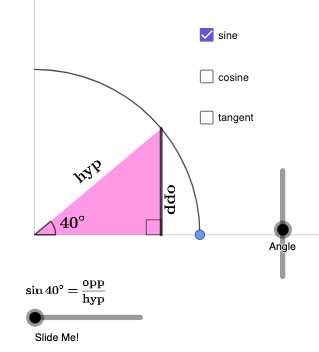
This example builds a dynamic right-triangle diagram to help learners visually grasp how sine, cosine, and tangent correspond to specific side-length ratios relative to a chosen acute angle, updating the annotations as the angle changes. It focuses on trigonometry concepts: the definitions of sin/cos/tan in a right triangle, the relationship between angles and side ratios, and the use of geometric representations (angles, arcs, and marked segments) to connect the function values to the triangle’s structure. Construction leverages GeoGebra commands referenced in the construct summary: Polygon for the triangle, Angle and Ray to define and display the key angle, Segment to mark the relevant opposite/adjacent/hypotenuse parts, and CircleArc to draw the angle arc. RotateText keeps labels aligned with the rotated angle, while Rotate updates the geometry consistently. Suitable for middle and high school instruction, introductory trigonometry lessons, and classroom or self-study demonstrations emphasizing geometric interpretations of trigonometric functions.
GeoGebra Commands & Parameters
Polygon((0, 0), (x(A), 0), A) → t1, a, g, hAngle(A, (x(A), 0), (0, 0)) → αAngle((x(A), 0), (0, 0), A) → βSegment((0, 0), A) → iSegment((0, 0), (x(A), 0)) → kRay((0, 0), (1, 0)) → jRay((0, 0), (0, 1)) → lRotateText(text2, (b * pi / 180)) → text3Segment((x(A), 0), A) → nRotateText(text4, ((-pi)) / 2) → text5RotateText(text7, β) → text8Rotate(k, If[0 < p ≤ 1, ((p * b) * pi / 180)], (0, 0)) → k'Rotate(n, If[0 < p ≤ 1, ((-p) * (pi / 2 - (b * pi / 180)))], A) → n'Rotate(n, If[0 < p ≤ 1, (p * pi / 2)], (x(A), 0)) → n'_{1}RotateText(text9, β) → text11RotateText(text14, (b * pi / 180)) → text15CircleArc((0, 0), (v, 0), (0, v)) → d
AI Drawing Prompt Reference
Draw a right triangle with one acute angle, and display the sine, cosine, and tangent values corresponding to this angle. As the angle changes, dynamically update the relationships between these values and the side lengths of the triangle. Use line segments to mark the opposite side, adjacent side, and hypotenuse, and draw an arc to represent the angle. Ensure the angle labels stay aligned with the rotating angle, maintaining dynamic consistency in the entire figure, suitable for trigonometry teaching demonstrations in middle and high school.
The prompt above was compiled from the original drawing commands and is for reference only.