
Closest unit squares under inclination using tangency
Loading the math board and drawing, please wait…
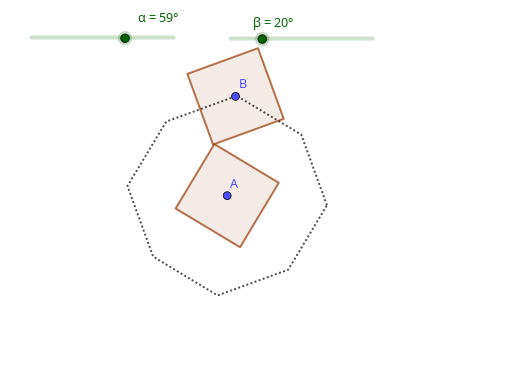
This example visualizes how two unit squares can be positioned relative to an inclination so that they satisfy a tangency (“tangent”) relationship, and how the resulting pair of closest/most fitting unit-square configurations can be constructed in the plane. It centers on core geometry ideas: polygon construction, tangency constraints between shapes, and representing inclination through angle parameters (e.g., α, β, γ). The construction is built by creating key points and then assembling the outlines as polygons. From the GeoGebra construction summary, it uses PolyLine, Point, and Polygon to define numerous construction points (α, β, γ, A, C, D, E, F, G, H, I, J, g, D1, C1, F1, G1, H1, I1, J1, E1, g1, B) and to form the two unit-square shapes via poly1 and poly2. Suitable for advanced secondary students and introductory university learners studying geometric construction, parametric angle reasoning, and constraint-based visual modeling.
GeoGebra Commands & Parameters
PolyLine(E, C, D, F, G, H, I, J, E) → gPolyLine(E1, C1, D1, F1, G1, H1, I1, J1, E1) → g1Point(If[γ < 0, g1, g]) → BPolygon(A + (sqrt(2) / 2; α + pi / 4), A + (sqrt(2) / 2; α + (3 * pi / 4)), 4) → poly1Polygon(B + (sqrt(2) / 2; β + pi / 4), B + (sqrt(2) / 2; β + (3 * pi / 4)), 4) → poly2
AI Drawing Prompt Reference
Draw two unit squares positioned by angle parameters α and β, satisfying a tangency relationship. Angle γ determines the center point of one square. The construction order is to first create key points like A and B, then form the outlines of the two squares. The drawing should clearly show the relative positions and tangency constraints.
The prompt above was compiled from the original drawing commands and is for reference only.