
Geometry Prisms: Constructing a Prism via Vector Translation
Loading the math board and drawing, please wait…
In collections
Geometry - Area & Volume
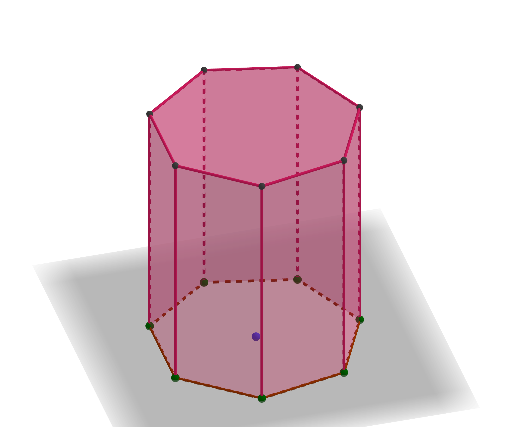
This example demonstrates how to build a prism by starting from a base polygon in the plane, translating it with a vector to obtain the top face, and then connecting corresponding vertices to form the lateral edges and faces. It highlights core ideas of solid geometry (the prism structure), geometric transformation by vector translation, and constructive geometry: creating points, polygons, and intersections to ensure consistent connectivity. In GeoGebra it uses commands such as Sequence (to generate point sets), Polygon (to form the base/top faces), Vector and Translate (to define and apply the displacement that maps A..B..l1 to A’..B’..l2), Prism (to create the prism body), Point (to define key vertices), and Intersect (to obtain intersection-based construction points). Suitable for middle/high school geometry lessons, especially for spatial reasoning, geometry construction skills, and interactive visualization of 3D solids from 2D components.
GeoGebra Commands & Parameters
Sequence(Rotate[B, ((2 * pi / b) * i), A], i, 0, b) → l1Polygon(l1) → poly1Vector(A, C) → uTranslate(poly1, u) → poly1'Sequence(Rotate[D, ((2 * pi / b) * i), C], i, 0, b) → l2Prism(poly1, D) → c, E, N, edge10, edge12, edge14, edge16, edge18, edge20, edge22, edge24, edge26, edge28, O, edge32, edge33, edge34, edge39, edge40, edge41, edge42, edge47, edge48, edge49, P, edge50, edge54, edge55, edge56, edge58, Q, R, S, T, U, V, W, F, Z, A_1, B_1, C_1, D_1, E_1, F_1, G_1, H_1, I_1, G, J_1, face1, face3, face4, face2, face5, face6, face7, face8, face9, H, face10, face11, face12, face13, face14, face15, face16, face17, face18, face19, I, face20, face21, face22, face23, face24, face25, face26, face27, face28, face29, J, face30, face31, faceDEFG, edge1, edge2, edge3, edge4, edge5, edge7, edge9, K, edge11, edge13, edge15, edge17, edge19, edge21, edge23, edge25, edge27, edge29, L, edge30, edge31, edge35, edge36, edge37, edge38, edge43, edge44, edge45, edge46, M, edge51, edge52, edge53, edge57, edgeDE, edgeEF, edgeFG, edgeDG, edge6, edge8Sequence(Rotate[B, ((2 * pi / 3) * i), A], i, 0, 3) → l3Sequence(Rotate[B, ((2 * pi / 3) * i) + pi / 3, A], i, 0, 3) → l4Point(l3) → K_1Point(l3) → L_1Point(l3) → M_1Polygon(K_1, L_1, M_1) → t1, m_1, k_1, l_1Point(l4) → N_1Point(l4) → O_1Point(l4) → P_1Polygon(N_1, O_1, P_1) → t2, p_1, n_1, o_1Intersect(m_1, o_1) → Q_1Intersect(m_1, p_1) → R_1Intersect(k_1, p_1) → S_1Intersect(k_1, n_1) → T_1Intersect(l_1, n_1) → U_1Intersect(l_1, o_1) → V_1Polygon(M_1, T_1, P_1, U_1, O_1, S_1, L_1, R_1, N_1, Q_1, K_1, V_1) → poly2, f, v_1, k, u_1, t_1, g, s_1, h, r_1, i, q_1, jPrism(poly2, D) → e, W_1, H_2, I_2, face32, face41, face40, face37, face36, face39, face38, face34, Z_1, face35, face43, face42, face33, face44, edge59, edge70, edge65, edge69, edge63, A_2, edge68, edge64, edge67, edge62, edge72, edge66, edge71, edge60, edge73, edge74, B_2, edge75, edge76, edge77, edge78, edge79, edge80, edge81, edge82, edge61, C_2, D_2, E_2, F_2, G_2Polygon(J_2, K_2, L_2, M_2, N_2, O_2, P_2, Q_2, R_2) → poly3, j_2, k_2, l_2, m_2, n_2, o_2, p_2, q_2, r_2Prism(poly3, S_2) → m, T_2, face47, face48, face49, face50, face51, face52, face53, face46, face54, edge83, U_2, edge84, edge85, edge86, edge87, edge88, edge89, edge90, edge91, edge92, edge94, V_2, edge95, edge96, edge97, edge98, edge99, edge100, edge93, W_2, Z_2, A_3, B_3, C_3, face45
AI Drawing Prompt Reference
Construct a 3D prism by starting from a planar base polygon (a regular-like multi-vertex shape) and translating the entire polygon by a defined vector to obtain a corresponding top face polygon. Ensure the vertices of the translated top face match the original base vertices one-to-one, then connect each corresponding pair to form the lateral edges and side faces, producing the prism solid. To mirror the more intricate example, also generate additional polygon sets from rotated point triples around the central position and integrate them so the final figure shows a prism body composed of multiple faces and edges.
The prompt above was compiled from the original drawing commands and is for reference only.