
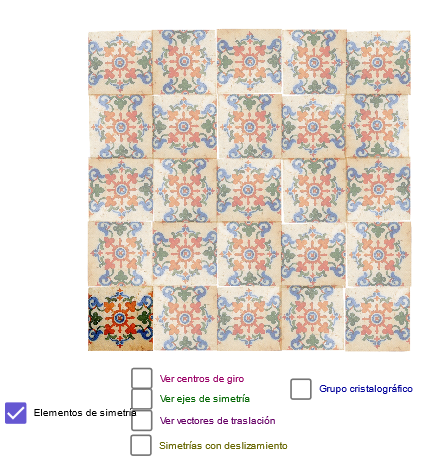
3.4.6 Museo de Onda: Azulejo 6 – Geometric Transformations in a Parallelepiped T
Loading the math board and drawing, please wait…
In collections
geometriadinamica.es
This GeoGebra example demonstrates how to construct a decorative tile pattern inspired by the Museo de Onda (Spain) using geometric transformations within a parallelepiped framework. The core mathematical concepts include geometric transformations (rotation, reflection, translation), the structure of a parallelepiped, tangent lines, midpoints, perpendiculars, and perimeter. The construction uses GeoGebra commands such as Line, Point, OrthogonalLine, Intersect, Midpoint, Mirror, Rotate, and Vector, involving objects like A, B, b, G, e, J, h, f, H, g, E, I, B_1, a, vp, vg, dif, c, vs, vr, vt, v, vd, gr, D, F, K, L, M, N, O, P, Q, R, S, T, U, V, W, Z. By applying rotations and reflections, a symmetric tile motif is generated. This resource is suitable for middle and high school students learning geometric transformations, symmetry, and spatial reasoning, and can be used in interdisciplinary projects connecting mathematics and art.
GeoGebra Commands & Parameters
Line(A, B) → bLine(G, b) → ePoint(e) → JOrthogonalLine(J, e) → hOrthogonalLine(G, e) → fPoint(f) → HOrthogonalLine(H, f) → gIntersect(g, h) → EMidpoint(E, H) → IMidpoint(I, E) → B_1Midpoint(G, J) → DMidpoint(J, E) → FMidpoint(H, G) → KMidpoint(D, I) → LMidpoint(K, L) → MMidpoint(L, F) → NMidpoint(F, J) → OMidpoint(J, D) → PMidpoint(G, D) → QMidpoint(K, G) → RMidpoint(Q, M) → SMidpoint(L, D) → TMidpoint(P, N) → UMidpoint(F, E) → VMidpoint(K, H) → WMidpoint(W, V) → ZMidpoint(H, I) → A_1Midpoint(N, B_1) → C_1Midpoint(Z, W) → D_1Midpoint(D, U) → E_1Midpoint(U, J) → F_1Midpoint(T, Q) → G_1Midpoint(S, G) → H_1Midpoint(S, K) → I_1Midpoint(M, T) → J_1Midpoint(T, N) → K_1Midpoint(N, O) → L_1Midpoint(F, C_1) → M_1Midpoint(C_1, L) → N_1Midpoint(L, D_1) → O_1Midpoint(D_1, K) → P_1Midpoint(H, D_1) → Q_1Midpoint(D_1, I) → R_1Midpoint(I, C_1) → S_1Midpoint(C_1, E) → T_1Mirror(F_1, h) → U_1Mirror(L_1, h) → V_1Mirror(M_1, h) → W_1Mirror(T_1, h) → Z_1Mirror(B_1, h) → A_2Mirror(L_1, h) → C_2Line(S, A_1) → tLine(I, T) → a_1Line(U, B_1) → b_1Line(E_1, N_1) → c_1Line(F_1, M_1) → d_1Line(G_1, R_1) → e_1Line(W_1, P_1) → g_1Line(Q_1, Z_1) → h_1Point(a_1) → F_2Point(b) → A1Min(90, ((a - 1) * 90)) → r1Rotate(F_2, ((-r1))°, T) → K_{11}Rotate(T, ((-r1))°, T) → T'_7Rotate(U, ((-r1))°, T) → U'_3Rotate(T, ((-r1))°, T) → T'_8Rotate(T, ((-r1))°, T'_8) → T'_9Rotate(F_2, ((-r1))°, T) → J_{13}Rotate(L, ((-r1))°, T) → L'_2Mirror(U'_3, b_1) → A_{14}Mirror(T'_8, b_1) → B_{14}Mirror(T'_9, b_1) → O_{15}Mirror(K_{11}, b_1) → G_{16}Mirror(T'_7, b_1) → H_{16}Mirror(J_{13}, b_1) → J_{17}Mirror(L'_2, b_1) → K_{17}Midpoint(C_1, E) → K_{20}Line(G_1, O_1) → l_1OrthogonalLine(G_1, l_1) → m_1OrthogonalLine(J_1, l_1) → q_1OrthogonalLine(O_1, l_1) → r_1OrthogonalLine(R_1, l_1) → s_1OrthogonalLine(E_1, m_1) → t_1OrthogonalLine(F_1, m_1) → a_2Point(a_1) → CMin(180, ((a - 1) * 180)) → r2Min(270, ((a - 1) * 270)) → r3Rotate(T, r1°, T) → T'_4Rotate(F_2, r1°, T) → G_2Rotate(T, r2°, T) → T'_5Rotate(F_2, r2°, T) → J_2Rotate(T, r3°, T) → T'_6Rotate(F_2, r3°, T) → N_2Rotate(F_2, r1°, T) → Q_2Rotate(C, r1°, T) → C'Rotate(F_2, r2°, T) → Z_2Rotate(C, r2°, T) → C'_1Rotate(F_2, r3°, T) → H_3Rotate(C, r3°, T) → C'_2Rotate(C, r1°, T) → C'_3Rotate(L, r1°, T) → L'_1Rotate(K_1, r1°, T) → Q_3Rotate(C, r2°, T) → C'_4Rotate(L, r2°, T) → L'_3Rotate(K_1, r2°, T) → Z_3Rotate(C, r3°, T) → C'_5Rotate(L, r3°, T) → L'_4Rotate(K_1, r3°, T) → H_4Mirror(C'_4, a_1) → F_5Mirror(L'_3, a_1) → G_5Mirror(Z_3, a_1) → J_5Mirror(Z_2, a_1) → O_5Mirror(C'_1, a_1) → P_5Mirror(T'_5, a_1) → W_5Mirror(J_2, a_1) → Z_5Mirror(C, a_1) → C'_6Mirror(L, a_1) → L'_5Mirror(K_1, a_1) → R_6Mirror(F_2, a_1) → T_6Mirror(C, a_1) → C'_7Mirror(T, a_1) → T'_{10}Mirror(F_2, a_1) → W_6Min(180, ((a - 5.5) * 180)) → r4Vector(S, D) → uVector(S, L) → wLine(S, O) → qLine(F, M) → rLine(D_1, V) → sIntersect(t, m_1) → B_2Intersect(a_1, m_1) → P_2Intersect(b_1, m_1) → R_2Intersect(h, m_1) → S_2Intersect(a_2, q) → T_2Intersect(t_1, q) → W_2Intersect(l_1, q) → A_3Intersect(t, q_1) → B_3Intersect(q_1, a_1) → C_3Intersect(b_1, q_1) → E_3Intersect(h, q_1) → G_3Intersect(a_2, r) → I_3Intersect(r, t_1) → J_3Intersect(r, l_1) → K_3Intersect(r_1, a_1) → L_3Intersect(b_1, r_1) → N_3Intersect(h, r_1) → P_3Intersect(t, r_1) → R_3Intersect(l_1, s) → S_3Intersect(s, t_1) → T_3Intersect(s, a_2) → U_3Vector(U, P) → zVector(U, O) → u_1Rotate(pic1, 270°, D_1) → pic1'Rotate(pic1', 270°, D_1) → pic1''Rotate(pic1'', 270°, D_1) → pic1'''Rotate(pic1', 270°, M) → pic1''_1Rotate(pic1''_1, 270°, M) → pic2Rotate(pic1''_1, 270°, S) → pic3Rotate(pic3, 270°, S) → pic3'Rotate(pic3, 270°, Q) → pic3'_1Rotate(pic3'_1, 270°, Q) → pic4Rotate(pic4, 270°, D) → pic4'Rotate(pic4', 270°, D) → pic4''Rotate(pic2, 270°, L) → pic2'Rotate(pic1'', 270°, Z) → pic1'''_1Rotate(pic1'''_1, 270°, Z) → pic5Rotate(pic4', 270°, P) → pic4''_1Rotate(pic4''_1, 270°, P) → pic6Rotate(pic4''_1, 270°, J) → pic7Rotate(pic6, 270°, O) → pic6'Rotate(pic6', 270°, O) → pic6''Rotate(pic6'', 270°, O) → pic6'''Rotate(pic6''', 270°, N) → pic8Rotate(pic8, 270°, C_1) → pic8'Rotate(pic6'', 270°, F) → pic6'''_1Rotate(pic6'''_1, 270°, V) → pic9
AI Drawing Prompt Reference
Create a decorative tile pattern using geometric transformations, starting by drawing a base line segment and marking points on it, then constructing perpendicular lines through those points to form a set of parallel lines; build a grid of numerous midpoints between these perpendicular lines and connect them to form complex geometric shapes; finally reflect part of the design across one of the perpendicular lines as an axis of symmetry to generate a symmetric tile motif within a parallelepiped framework.
The prompt above was compiled from the original drawing commands and is for reference only.