
Geometric Visualization of Area Unit Conversions
Loading the math board and drawing, please wait…
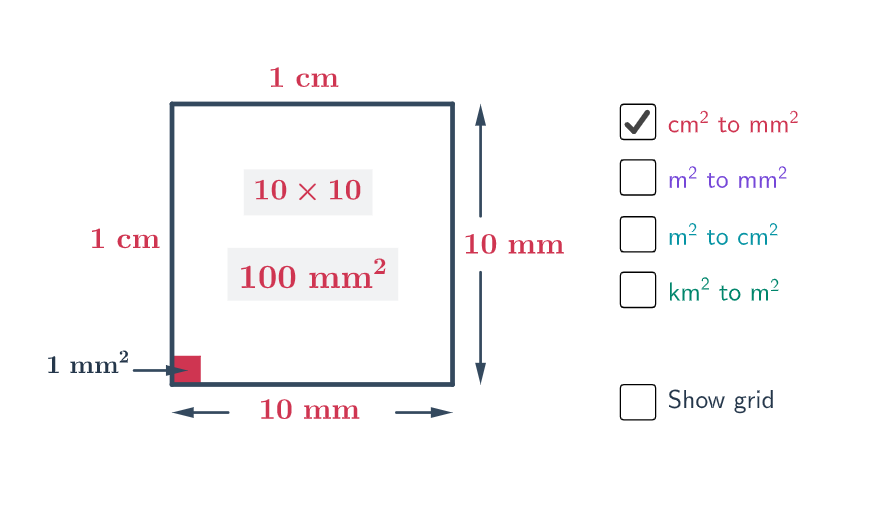
This example demonstrates, with a constructed geometry figure and labeled measurements, how to convert between different area units under a chosen reference length. It highlights the core idea that area scales with the square of the corresponding length unit, enabling consistent and verifiable unit conversion. The construction builds key points and segments (Segment, Point), uses Vector elements for directional/measurement relationships, and determines reference locations via intersections (Intersect). A Polygon is formed to represent the measurable area region, while additional labeled text objects display the unit quantity (unit) and the computed conversion factors/results. Suitable for middle to early university mathematics instruction, especially for lessons on unit conversion, area measurement, and connecting geometric regions to quantitative scaling.
GeoGebra Commands & Parameters
Segment(A, B) → aSegment(B, C) → bSegment(C, D) → cSegment(D, A) → dVector(G, E) → uVector(H, F) → vVector(J, K) → wVector(I, L) → zSegment(O, M) → eSegment(O_1, M_1) → e_1Segment(O_2, M_2) → e_2Segment(O_3, M_3) → e_3Segment(O_4, M_4) → e_4Segment(O_5, M_5) → e_5Segment(O_6, M_6) → e_6Segment(O_7, M_7) → e_7Segment(O_8, M_8) → e_8Point(b) → PSegment(N, P) → fSegment(B_1, C_1) → b_1Point(b_1) → P_1Segment(N_1, P_1) → f_1Segment(B_3, C_3) → b_3Point(b_3) → P_3Segment(N_3, P_3) → f_3Segment(B_4, C_4) → b_4Point(b_4) → P_4Segment(N_4, P_4) → f_4Segment(B_5, C_5) → b_5Point(b_5) → P_5Segment(N_5, P_5) → f_5Segment(B_6, C_6) → b_6Point(b_6) → P_6Segment(N_6, P_6) → f_6Segment(B_7, C_7) → b_7Point(b_7) → P_7Segment(N_7, P_7) → f_7Segment(B_8, C_8) → b_8Point(b_8) → P_8Segment(N_8, P_8) → f_8Segment(B_2, C_9) → b_2Point(b_2) → P_2Segment(N_9, P_2) → f_2Intersect(c, d) → QIntersect(d, f) → RIntersect(e, f) → SIntersect(c, e) → TPolygon(Q, R, S, T) → poly1, q, r, s, tVector(U, V) → gIntersect(c, d) → ZPolygon(Z, X, W, Y) → poly2, z_1, A_1, w_1, D_1
AI Drawing Prompt Reference
Create a geometric figure demonstrating area unit conversions. Start by drawing a quadrilateral outline formed by four connected line segments. Add four vectors inside to represent directional and measurement relationships. Then draw multiple parallel reference line segments that divide the space into several rectangular regions. Take points on some segments and draw lines from specific points to these points, creating a grid-like pattern. Finally, determine four key points through segment intersections and form a polygon with these four points. Label each region with measurement values and unit conversion factors to visually show how area scales with the square of the side length.
The prompt above was compiled from the original drawing commands and is for reference only.