
Geometric Conversion of Complex Numbers: Cartesian to Polar
Loading the math board and drawing, please wait…
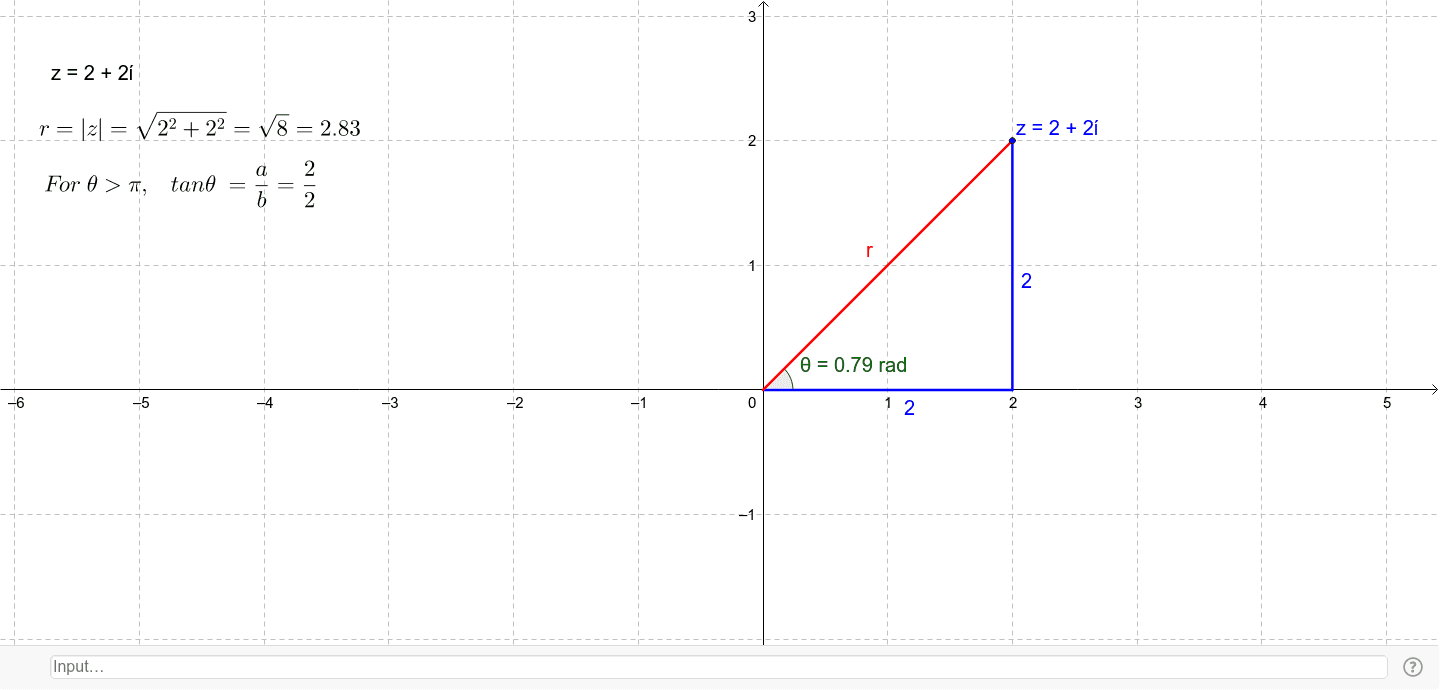
This example demonstrates how a single complex number is represented in the complex plane when switching from Cartesian coordinates to polar form. Visually, it relates the modulus r (distance from the origin) and the argument θ (rotation angle) to the same point z, making the equivalence between a+bi and r(cosθ + i sinθ) clear. The construction centers on key concepts: complex numbers on the complex plane, modulus and argument, angle measurement, and right-triangle/projection geometry. In GeoGebra, the build uses objects such as z and several auxiliary points/labels (e.g., a, b, r, θ, A, B, c, d, e, f, and text annotations) together with commands OrthogonalLine (to draw perpendicular aids), Intersect (to compute intersection points for the construction), Segment (to show the relevant geometric segments like radii/projections), and Angle (to display the argument θ). Suitable for high school to early university students, especially for introductory complex-number lessons, coordinate-geometry visualization, and trigonometry-based understanding.
GeoGebra Commands & Parameters
OrthogonalLine(z, xAxis) → cIntersect(c, xAxis) → ASegment(z, A) → dIntersect(xAxis, yAxis) → BSegment(A, B) → eSegment(B, z) → fAngle(A, B, z) → θ
AI Drawing Prompt Reference
Draw a complex number z on the complex plane, converting from Cartesian to polar form. Start by plotting point z, then draw a perpendicular line c to the x-axis, intersecting at point A. Connect z and A with line segment d. Next, plot the intersection of the x-axis and y-axis at point B, connect A and B with line segment e, and connect B and z with line segment f. Finally, label angle θ as the angle from A to B to z.
The prompt above was compiled from the original drawing commands and is for reference only.