
Conformal Mapping Visualization: Preserving Angles via Splines and Vectors
Loading the math board and drawing, please wait…
In collections
Complex Analysis: A visual and interactive introduction
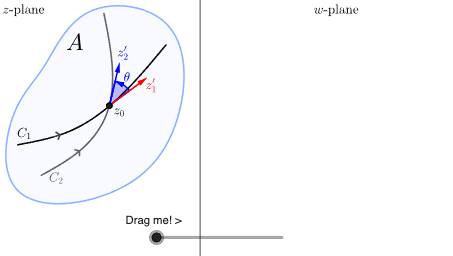
This example demonstrates how a conformal mapping transforms curves and geometric directions from one plane setting to another, allowing students to visually verify the key property of local angle preservation. The main mathematical ideas include conformal maps in the complex plane (as angle-preserving local transformations) and geometric verification using angle measurements between mapped objects. Construction highlights: GeoGebra’s Spline is used to create the reference curve(s) from control points; Point defines key sampling/anchor locations; Segment and OrthogonalLine support layout and perpendicular directions for geometric comparisons. Vector and Angle are employed to represent and measure directional changes before and after mapping. Translate and Intersect are used to shift configurations and compute intersection points that define the mapped structure. A set of paired objects (e.g., multiple “U/V” and “u/v” point sets and several intermediate points like Z* and X*) is prepared to contrast source-domain geometry with its image-domain counterpart. Suitable for high school advanced topics through undergraduate pre-calculus/complex-analysis visualization, especially for introducing the geometric meaning of conformal mappings.
GeoGebra Commands & Parameters
Spline({A1, A2, A3, A4}, 3) → aVector(A1, U1) → u1Point(a, t) → MVector(A4, U2) → u2Vector(A1, V1) → v1Vector(A4, V2) → v2Spline({A, B, C}, 3) → bSpline({D, E, F, G}, 3) → cSpline({H, I, J}, 3) → dSpline({K, L, N, O}, 3) → eSpline({Z1, Z2, Z3}, 3) → s1Spline({X1, X2, X3, X4}, 3) → s2Intersect(s1, s2, 0, 1) → QTranslate(Vector[(u1 * (1 - t)) + (t * u2)], Q) → uTranslate(Vector[(v1 * (1 - t)) + (t * v2)], Q) → vAngle(u, v) → alpha1Angle(u1, v1) → alpha2Spline({P, R, S, T, U, V, W, P}, 3) → fSpline({Z, A_1, B_1, C_1, D_1, E_1, F_1, G_1, H_1, Z}, 3) → gSegment(R1, R2) → seg1Segment(R3, R4) → seg2Segment(R5, R6) → seg3Segment(R7, R8) → seg4OrthogonalLine(I_1, xAxis) → h
AI Drawing Prompt Reference
Show a conformal mapping visualization graph with spline curves defining reference curves, and points measuring direction changes via vectors and angles. The graph displays geometric structures of source and target domains, using line segments and orthogonal lines for layout. The construction order is: first create spline curves as references, then define key points, then draw vectors and angles, and finally compare geometric relationships between source and target domains via translation and intersection.
The prompt above was compiled from the original drawing commands and is for reference only.