
Two-Step Geometric Transformations Quiz: Reflection & Rotation (V2)
Loading the math board and drawing, please wait…
In collections
Translations, Rotations, Reflections Exercises
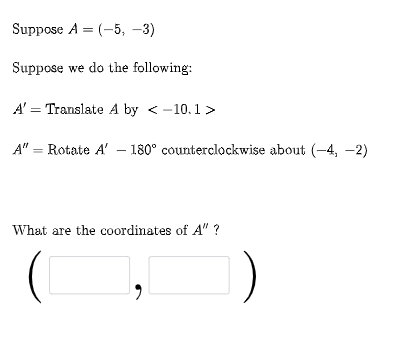
This example demonstrates, in a quiz-like interactive way, how a point (and its defining data such as vectors/parameters) moves when two transformations are applied sequentially. It highlights the effect of geometric transformations—especially reflection and rotation (optionally alongside translation)—and how the final position is determined by the composition of the first and second steps. The core math concepts include geometric transformations, vector interpretation of motion, angle-dependent rotation behavior, and verifying relationships after composing multiple transforms. Construction-wise, GeoGebra commands such as Random and RandomElement generate random configuration parameters and initial objects (a, b, c, d, u, v, ang1), while Vector is used to build directed quantities. If controls conditional choices of transformation branches, producing intermediate results like FirstTrans and SecondTrans and corresponding points (P1, P2, P3). Additional objects (e.g., text labels via Textfield, button1 for interaction, and angle/marker elements such as A1/A2/A3, text1–text5) support displaying the quiz prompt and the transformation details. Suitable for middle school through early university students, as classroom demonstration, self-practice, and interactive assessment on transformation geometry.
GeoGebra Commands & Parameters
Random(-10, 10) → aRandom(-10, 10) → bRandom(1, 3) → FirstTransRandom(1, 3) → SecondTransRandom(-10, 10) → cRandom(-10, 10) → dVector((c, d)) → uRandom(-10, 10) → c2Random(-10, 10) → d2Vector((c2, d2)) → vIf(n1 ≟ 1, {2, 3}, n1 ≟ 2, {1, 3}, n1 ≟ 3, {1, 2}) → secondlistRandom(-10, 10) → fRandom(-10, 10) → gRandom(-10, 10) → f2Random(-10, 10) → g2RandomElement(m) → ang1Random(1, 3) → ThirdtransRandom(-10, 10) → kRandom(-10, 10) → lVector((k, l)) → wRandomElement(l1) → hIf(n1 ≟ 1, Translate[A, u], n1 ≟ 2, Rotate[A, ang1, P2], n1 ≟ 3, Mirror[A, h]) → A1If(n2 ≟ 1, Translate[A1, u], n2 ≟ 2, Rotate[A1, ang1, P2], n2 ≟ 3, Mirror[A1, h]) → A2If(n3 ≟ 1, Translate[A2, u], n3 ≟ 2, Rotate[A2, ang1, P2], n3 ≟ 3, Mirror[A2, h]) → A3Textfield(e1) → InputBox1Textfield(e2) → InputBox2If(e1 ≟ x(A2), "√", "X") → text14If(e2 ≟ y(A2), "√", "X") → text15
AI Drawing Prompt Reference
Create an interactive geometry quiz showing a random initial point, then apply two randomly chosen transformations (translation, rotation, or reflection) sequentially to get intermediate and final points. Use arrow vectors for translation, angle markers for rotation, and dashed lines for reflection axes. Display all three points on the canvas, with text boxes for the user to input the final coordinates, and show check or cross marks based on correctness. Include random parameters, step labels, and interactive input fields.
The prompt above was compiled from the original drawing commands and is for reference only.