
6Q Quiz: Three-Step Transformations (Translate–Rotate–Reflect)
Loading the math board and drawing, please wait…
In collections
Translations, Rotations, Reflections Exercises
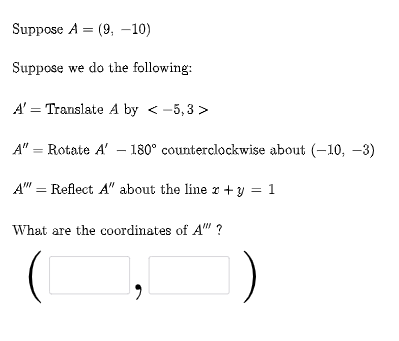
This GeoGebra example demonstrates how to apply a three-step geometric transformation pipeline on the plane and verify the final correspondence between points. It centers on Translation, Rotation, and Reflection, emphasizing how consecutive mappings move points/vectors to produce a predictable final location. The construction is designed as a quiz: Random parameters and choices are generated with Random and RandomElement; Vector objects provide geometric representation; If handles conditional logic for selecting/validating the transformation setup; Textfield supports interactive inputs/feedback. Dedicated transformation objects (e.g., FirstTrans, SecondTrans, Thirdtrans) and point trackers (P1, P2, P3) encode the transformation chain. Lists such as masterlist and intermediate lists manage candidates, while angle controls (e.g., ang1 and related parameters) define rotation/reflection orientation. The setup is suitable for middle and high school geometry practice, transformation unit reviews, and classroom exploratory learning with GeoGebra.
GeoGebra Commands & Parameters
Random(-10, 10) → aRandom(-10, 10) → bRandom(1, 3) → FirstTransRandom(1, 3) → SecondTransRandom(-10, 10) → cRandom(-10, 10) → dVector((c, d)) → uRandom(-10, 10) → c2Random(-10, 10) → d2Vector((c2, d2)) → vIf(n1 ≟ 1, {2, 3}, n1 ≟ 2, {1, 3}, n1 ≟ 3, {1, 2}) → secondlistRandom(-10, 10) → fRandom(-10, 10) → gRandom(-10, 10) → f2Random(-10, 10) → g2RandomElement(m) → ang1Random(1, 3) → ThirdtransRandom(-10, 10) → kRandom(-10, 10) → lVector((k, l)) → wRandomElement(l1) → hIf(n1 ≟ 1, Translate[A, u], n1 ≟ 2, Rotate[A, ang1, P2], n1 ≟ 3, Mirror[A, h]) → A1If(n2 ≟ 1, Translate[A1, u], n2 ≟ 2, Rotate[A1, ang1, P2], n2 ≟ 3, Mirror[A1, h]) → A2If(n3 ≟ 1, Translate[A2, u], n3 ≟ 2, Rotate[A2, ang1, P2], n3 ≟ 3, Mirror[A2, h]) → A3Textfield(e1) → InputBox1Textfield(e2) → InputBox2If(e1 ≟ x(A3), "√", "X") → text14If(e2 ≟ y(A3), "√", "X") → text15
AI Drawing Prompt Reference
Create a geometry transformation practice diagram: start with a point on the plane, then apply three consecutive geometric transformations - the first can be translation, rotation, or reflection, and the same three options are randomly chosen for the second and third transformations. Each transformation uses randomly generated vectors or angles as parameters. Show the complete path of the three transformations visually, using vector arrows to indicate translation direction and magnitude, rotation marks to show rotation angles, and reflection axes for mirror reflections. Finally, provide two input boxes for users to enter the x and y coordinates of the final point, with the system automatically checking and displaying correct or incorrect marks.
The prompt above was compiled from the original drawing commands and is for reference only.