
Equations of Tangents to Circles via Geometric Construction
Loading the math board and drawing, please wait…
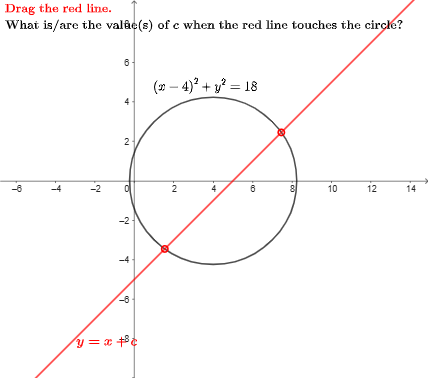
This GeoGebra example demonstrates how to construct and obtain the equations of tangents to a circle (typically from a given point/configuration) while visually linking the algebraic tangent equations with the underlying geometry. It centers on the tangent-to-circle property (radius is perpendicular to the tangent at the touch point), and the translation of that geometric condition into coordinate-geometry style equations. The construction is organized using GeoGebra commands Point, Intersect, and If: Point is used to create the key geometric objects (including several labeled/structured points and auxiliary points involved in the configuration), Intersect is used to compute intersection results that identify tangent-related points/lines, and If selects different construction branches based on conditions so the tangent equation/geometry remains consistent across cases. The activity is suitable for advanced high-school learners and early university students studying analytic geometry, circle geometry, and (as suggested by the example theme) complex-number or similarity-transformation viewpoints.
GeoGebra Commands & Parameters
Point(eq1) → AIntersect(g, yAxis) → BIf(x(Intersect[y = y(Corner[1]) + 1, g]) > x(Corner[1]), Intersect[y = y(Corner[1]) + 1, g], Intersect[x = x(Corner[1]) + 1, g]) → DIntersect(eq1, g) → C, E
AI Drawing Prompt Reference
Draw a circle and a tangent line. The circle is centered at the origin with a radius of 5. The line starts from a point outside the circle and touches the circle at one point. Show the geometric relationship between the circle and the line, and the position of the tangent point.
The prompt above was compiled from the original drawing commands and is for reference only.