
Battleship Geometry: Polar-Style Construction with Intersections (V2)
Loading the math board and drawing, please wait…
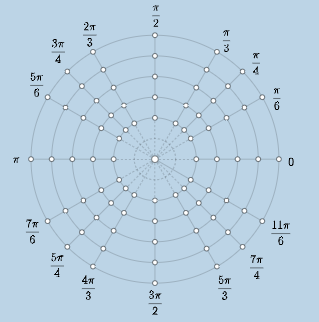
This example demonstrates a “Battleship”-style geometric configuration built from a polar-coordinate construction idea: using rotations, rays, and circular arcs to create multiple key points defined by circle intersections, and then connecting them into a structured, symmetric-looking diagram. The main math concepts include rotation-based (polar-style) geometry construction, circle and arc relationships, intersection point computation, and constraint-driven reasoning from geometric entities (with background links to orthocenter-related ideas and quadratic-function/equation interpretations). Construction highlights in GeoGebra: Rotate is used to generate rotated directions/positions; Segment and Ray establish connecting and half-line constraints; Circle creates the underlying circles; Intersect finds the defining intersection points; and CircleArc draws arc boundaries to shape the final contour. The resulting figure is formed by combining the constructed objects and intersection points listed in the provided construction summary. Suitable for advanced middle school through introductory university work, especially for lessons on geometric construction, analytic-style geometry, and using dynamic geometry to reason about constraints and symmetry.
GeoGebra Commands & Parameters
Rotate(G, pi / 4) → G'_1Segment(A, G'_1) → jRotate(G, (11 * pi / 6)) → G'_5Segment(A, G'_5) → pCircle(A, F) → c_1Intersect(c_1, j, 1) → RSegment(A, R) → bRotate(G, (2 * pi / 3)) → G'_4Circle(A, B) → qSegment(A, G'_4) → nIntersect(q, n, 1) → TCircleArc(A, B, T) → h_1Ray((0, 0), (1, 0)) → fRotate(G, pi / 6) → G'Rotate(G, pi / 3) → G'_2Rotate(G, pi / 2) → G'_3Segment(A, G') → iSegment(A, G'_2) → lSegment(A, G'_3) → mRotate(G, (3 * pi / 4)) → G'_{6}Rotate(G, (5 * pi / 6)) → G'_{7}Rotate(G, pi) → G'_{8}Rotate(G, (7 * pi / 6)) → G'_{9}Rotate(G, (5 * pi / 4)) → G'_{10}Rotate(G, (4 * pi / 3)) → G'_{11}Rotate(G, (3 * pi / 2)) → G'_{12}Rotate(G, (5 * pi / 3)) → G'_{13}Rotate(G, (7 * pi / 4)) → G'_{14}Segment(A, G'_{6}) → aSegment(A, G'_{7}) → f_1Segment(A, G'_{8}) → g_1Segment(A, G'_{9}) → i_1Segment(A, G'_{10}) → j_1Segment(A, G'_{11}) → k_1Segment(A, G'_{12}) → l_1Segment(A, G'_{13}) → m_1Segment(A, G'_{14}) → n_1Circle(A, G) → d_1Circle(A, E) → tCircle(A, D) → sCircle(A, C) → rIntersect(r, i, 1) → HIntersect(s, i) → I,Intersect(t, i, 1) → JIntersect(c_1, i, 1) → KIntersect(d_1, i, 1) → MIntersect(d_1, j, 1) → NIntersect(c_1, j, 1) → OIntersect(t, j, 1) → PIntersect(s, j, 1) → QIntersect(r, j, 1) → SIntersect(r, l, 1) → UIntersect(s, l, 1) → VIntersect(t, l, 1) → WIntersect(c_1, l, 1) → ZIntersect(d_1, l) → A_1,Intersect(s, m, 1) → C_1Intersect(r, m, 1) → D_1Intersect(t, m, 1) → E_1Intersect(c_1, m, 1) → F_1Intersect(d_1, m, 1) → G_1Intersect(r, n, 1) → I_1Intersect(s, n, 1) → J_1Intersect(t, n, 1) → K_1Intersect(c_1, n, 1) → L_1Intersect(d_1, n, 1) → M_1Intersect(r, a, 1) → O_1Intersect(r, f_1, 1) → R_1Intersect(s, f_1, 1) → S_1Intersect(t, f_1, 1) → T_1Intersect(c_1, f_1, 1) → U_1Intersect(d_1, f_1, 1) → V_1Intersect(d_1, a) → W_1,Intersect(c_1, a, 1) → Z_1Intersect(t, a, 1) → A_2Intersect(s, a, 1) → B_2Intersect(r, g_1) → E_2,Intersect(s, g_1, 1) → F_2Intersect(t, g_1) → G_2,Intersect(c_1, g_1, 1) → H_2Intersect(d_1, g_1, 1) → I_2Intersect(d_1, i_1, 1) → J_2Intersect(c_1, i_1, 1) → K_2Intersect(t, i_1, 1) → L_2Intersect(s, i_1, 1) → M_2Intersect(r, i_1, 1) → N_2Segment(A, H) → p_1Segment(A, S) → q_1Segment(A, D_1) → r_1Segment(A, I_1) → s_1Segment(A, O_1) → t_1Segment(A, R_1) → a_1Segment(A, E_2) → b_1Segment(A, N_2) → e_1Intersect(r, l_1, 1) → B_1Intersect(s, l_1, 1) → H_1Intersect(t, l_1) → N_1,Intersect(c_1, l_1, 1) → P_1Intersect(d_1, l_1, 1) → Q_1Intersect(d_1, m_1, 1) → C_2Intersect(c_1, m_1, 1) → D_2Intersect(t, m_1, 1) → O_2Intersect(s, m_1, 1) → P_2Intersect(r, m_1, 1) → Q_2Intersect(r, n_1) → R_2,Intersect(r, k_1, 1) → S_2Intersect(s, k_1, 1) → T_2Intersect(t, k_1, 1) → U_2Intersect(c_1, k_1, 1) → V_2Intersect(d_1, k_1, 1) → W_2Intersect(d_1, j_1, 1) → Z_2Intersect(c_1, j_1, 1) → A_3Intersect(t, j_1, 1) → B_3Intersect(s, j_1, 1) → C_3Intersect(r, j_1, 1) → D_3Intersect(r, p) → E_3,Intersect(s, p, 1) → F_3Intersect(t, p, 1) → G_3Intersect(c_1, p, 1) → H_3Intersect(d_1, p, 1) → I_3Intersect(r, f, 1) → J_3Intersect(s, f, 1) → K_3Intersect(t, f, 1) → L_3Intersect(c_1, f) → M_3,Intersect(d_1, f, 1) → N_3Segment(A, J_3) → f_2Segment(A, H) → g_2Segment(A, S) → h_2Segment(A, U) → i_2Segment(A, D_1) → j_2Segment(A, I_1) → k_2Segment(A, O_1) → l_2Segment(A, R_1) → m_2Segment(A, E_2) → n_2Segment(A, N_2) → p_2Segment(A, D_3) → q_2Segment(A, S_2) → r_2Segment(A, B_1) → s_2Segment(A, Q_2) → t_2Segment(A, R_2) → a_2Segment(A, E_3) → b_2Segment(E_3, I_3) → c_2Segment(J_3, N_3) → d_2Segment(H, M) → e_2Segment(S, N) → f_3Segment(U, A_1) → g_3Segment(D_1, G_1) → h_3Segment(I_1, M_1) → i_3Segment(O_1, W_1) → j_3Segment(R_1, V_1) → k_3Segment(E_2, I_2) → l_3Segment(N_2, J_2) → m_3Segment(D_3, Z_2) → n_3Segment(S_2, W_2) → p_3Segment(B_1, Q_1) → q_3Segment(Q_2, C_2) → r_3Segment(R_2, G'_{14}) → s_3Intersect(s, s_3, 1) → O_3Intersect(t, s_3, 1) → P_3Intersect(c_1, s_3, 1) → Q_3
AI Drawing Prompt Reference
The figure consists of points generated by rotations, connected to the origin by line segments. Circles centered at the origin with different radii and circular arcs outline the boundaries. Intersection points of circles, line segments, and arcs define key nodes, creating symmetric regions. The overall figure exhibits rotational symmetry, with line segments, circles, and arcs interconnected, and intersection points serving as structural nodes, resulting in a complex and symmetric geometric pattern.
The prompt above was compiled from the original drawing commands and is for reference only.