
Relative Positions of Two Circles: Interactive Exploration
Loading the math board and drawing, please wait…
In collections
Euclidean Geometry
This GeoGebra example provides an interactive exploration of the five relative positions between two circles: externally disjoint, externally tangent, intersecting, internally tangent, and internally contained. It includes practice questions and proof-oriented activities. Core mathematical concepts involve circle equations, the relationship between center distance and radii, identification of tangent and secant lines, and geometric reasoning. The construction uses commands such as Shuffle, Element, Sequence, Point, Segment, Circle, and circlePixels to generate randomized cases, while sliders (aniSli) animate transitions and buttons (btnNew) refresh problems. A reset script (scriptResetApp) enables dynamic feedback. Suitable for middle and high school geometry classes, math labs, or self-study, this resource helps learners derive the conditions for each positional case and understand the geometric meaning of tangents and secants through visual manipulation.
GeoGebra Commands & Parameters
Shuffle({1, 2, 3}) → allCaseNum, {2, 1, 3}Element(allCaseNum, Mod[countQuestion, Length[allCaseNum]] + 1) → caseNumSequence((t, 0), t, -5, 5, 0.25) → centrListPoint(centrList) → C1Point(centrList) → C2Segment(C1, C2) → distCentPoint(Sequence[(x(C1) + t, y(C1)), t, 1, 3, 0.25]) → DPoint(Sequence[(x(C2) - t, y(C2)), t, 1, 3, 0.25]) → ESegment(C1, D) → rC1Segment(C2, E) → rC2Circle(C1, D) → c1Circle(C2, E) → c2circlePixels(C1, 7 + (7 * pulsing), (xMin, yMin), (xMax, yMax), (PXwidth, PXheight)) → pulsingObject1circlePixels(C2, 7 + (7 * pulsing), (xMin, yMin), (xMax, yMax), (PXwidth, PXheight)) → pulsingObject2circlePixels(D, 5 + (7 * pulsing), (xMin, yMin), (xMax, yMax), (PXwidth, PXheight)) → pulsingObject3circlePixels(E, 5 + (7 * pulsing), (xMin, yMin), (xMax, yMax), (PXwidth, PXheight)) → pulsingObject4
AI Drawing Prompt Reference
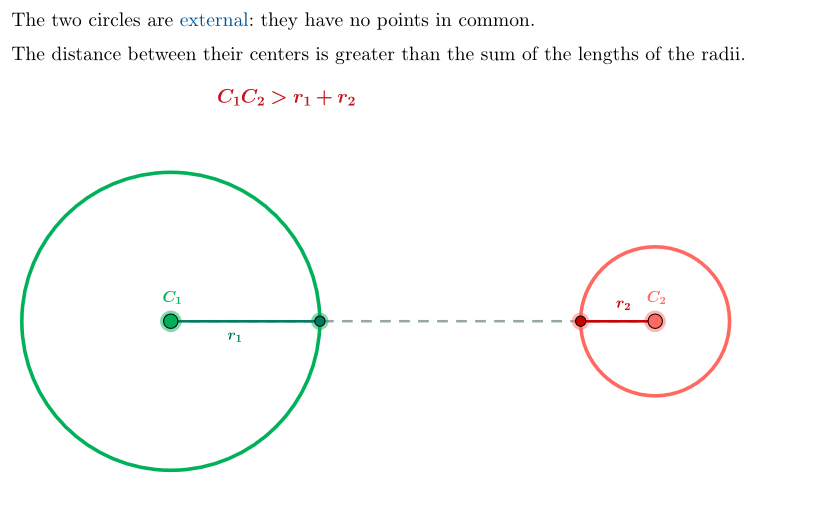
Draw two circles that can be externally disjoint, externally tangent, intersecting, internally tangent, or internally contained. First, randomly generate the positions of the centers, then draw the circles based on the center distance and radii. Use sliders to adjust the center positions and observe the changes in the relationship between the circles. Draw a line segment connecting the two centers, and draw two line segments from each center that intersect the circles at two points. Adjust the center positions to observe the dynamic changes in the circles for different positional cases.
The prompt above was compiled from the original drawing commands and is for reference only.