
Two-Step Transformations Quiz: Translation–Rotation–Reflection
Loading the math board and drawing, please wait…
In collections
Translations, Rotations, Reflections Exercises
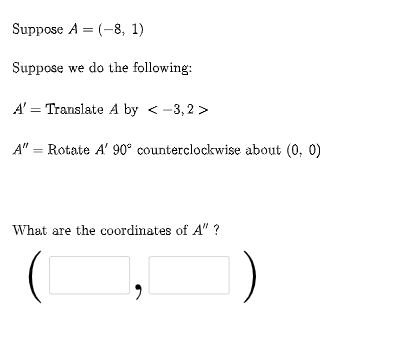
This GeoGebra example presents a quiz-style activity where a point or shape is transformed in two sequential steps, selected randomly, and the learner tracks how coordinates and images change after each operation. It demonstrates composition of geometric transformations (translation/rotation/reflection), angle-driven behavior, and vector-based reasoning for locating corresponding points in the plane. Construction highlights: Random and RandomElement are used to generate parameters and choose transformation types; Vector builds displacement or direction components; If controls which transformation rule is applied based on the selected case; Textfield enables user interaction and parameter entry. The model creates intermediate and final images using objects such as FirstTrans, SecondTrans, Thirdtrans, along with point sequences like P1, P2, P3 and associated mapping expressions (e.g., f, g and f2, g2). Angle objects such as ang1/ang determine rotation or reflection orientation, while button1 and text annotations (text1–text5) present the quiz prompts and results. Suitable for middle and high school learners and for instructional practice on transformation geometry and coordinate geometry.
GeoGebra Commands & Parameters
Random(-10, 10) → aRandom(-10, 10) → bRandom(1, 3) → FirstTransRandom(1, 3) → SecondTransRandom(-10, 10) → cRandom(-10, 10) → dVector((c, d)) → uRandom(-10, 10) → c2Random(-10, 10) → d2Vector((c2, d2)) → vIf(n1 ≟ 1, {2, 3}, n1 ≟ 2, {1, 3}, n1 ≟ 3, {1, 2}) → secondlistRandom(-10, 10) → fRandom(-10, 10) → gRandom(-10, 10) → f2Random(-10, 10) → g2RandomElement(m) → ang1Random(1, 3) → ThirdtransRandom(-10, 10) → kRandom(-10, 10) → lVector((k, l)) → wRandomElement(l1) → hIf(n1 ≟ 1, Translate[A, u], n1 ≟ 2, Rotate[A, ang1, P2], n1 ≟ 3, Mirror[A, h]) → A1If(n2 ≟ 1, Translate[A1, u], n2 ≟ 2, Rotate[A1, ang1, P2], n2 ≟ 3, Mirror[A1, h]) → A2If(n3 ≟ 1, Translate[A2, u], n3 ≟ 2, Rotate[A2, ang1, P2], n3 ≟ 3, Mirror[A2, h]) → A3Textfield(e1) → InputBox1Textfield(e2) → InputBox2If(e1 ≟ x(A2), "√", "X") → text14If(e2 ≟ y(A2), "√", "X") → text15
AI Drawing Prompt Reference
This is a geometric transformation quiz activity that shows how points or shapes change after two sequential transformations. Random transformation types like translation, rotation, or reflection are selected, and vectors represent displacement. Learners track changes in coordinates and images to understand transformation composition and point correspondence. The graphic includes initial and final points, intermediate images, and random parameters controlling transformation settings. Suitable for middle and high school students learning transformation geometry and coordinate geometry.
The prompt above was compiled from the original drawing commands and is for reference only.