
2D Vector Components from Endpoint Coordinates
Loading the math board and drawing, please wait…
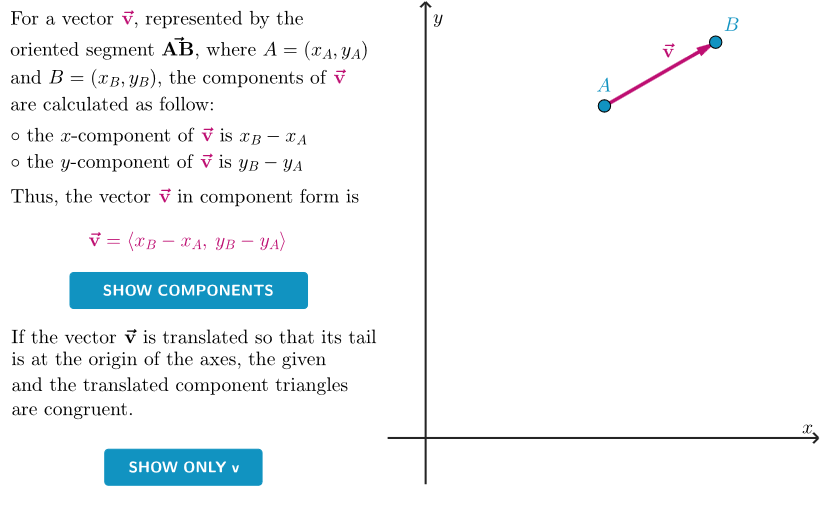
This example demonstrates—using a “components triangle” construction—how to compute the x- and y-components of a 2D vector when the coordinates of its endpoints are given. It centers on the mathematical ideas of vector decomposition, coordinate representation of vectors, constructing component relationships geometrically, and connecting those constructions to the corresponding algebraic formulas. The GeoGebra build uses Polygon to define the key geometric shape, PointIn and Vector to create and manage vector-related objects, Translate to reposition vectors for component reading, and Midpoint to locate important points. It also employs Segment to display the triangle sides/legs used as components, and If for conditional visibility and logic in the construction. Sliders and controls (e.g., translation/animation options) enable interactive observation of how the components change as endpoints move. Suitable for secondary school vector/coordinate geometry lessons and for early university prep focusing on vector components and geometric intuition.
GeoGebra Commands & Parameters
Polygon({PP1, PP2, PP3, PP4}) → peepPointIn(peep) → APointIn(peep) → BVector(A, B) → givenVIf(0 ≤ aniSli < 1, ((1 - aniSli) * A) + (aniSli * STAB), STAB) → AXVector(A, AX) → vecAXIf(1 ≤ aniSli ≤ 2, ((2 - aniSli) * STAB) + ((aniSli - 1) * B), STAB) → BYVector(STAB, BY) → vecBYSegment(A, XA) → projAXSegment(B, XB) → projBXSegment(A, YA) → projAYSegment(B, YB) → projBYVector(A, (0, 0)) → transVecTranslate(givenV, A') → movedVTranslate(vecAX, A') → vecAXOTranslate(vecBY, STAB + (transSli * transVec)) → vecBYOMidpoint(A, STAB) → MXMidpoint(B, STAB) → MY
AI Drawing Prompt Reference
Draw a 2D vector component diagram to show how to calculate the x and y components of a vector from its endpoint coordinates. Start by drawing a quadrilateral, then select two points on it to define a vector. Construct the component triangle geometrically by drawing two segments parallel to the x and y axes, representing the components. Move the original vector to a suitable position and display its start and end points to observe the relationship between the components and the original vector.
The prompt above was compiled from the original drawing commands and is for reference only.