
Three-Step Geometry Transformations: Reflection, Rotation & Translation
Loading the math board and drawing, please wait…
In collections
Translations, Rotations, Reflections Exercises
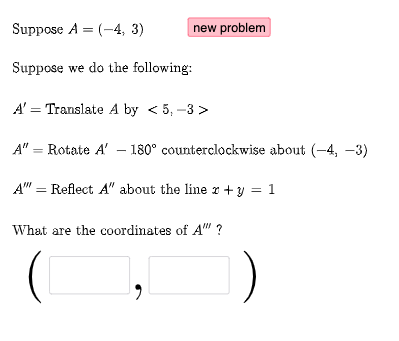
This example demonstrates a geometric object (commonly a triangle) undergoing three consecutive transformations on the plane, showing how its position changes step by step. The key concepts are geometric transformations—reflection and rotation—along with translation expressed via vectors, angle/parameter control, and conditional construction to switch or refine intermediate steps (via If). The construction uses GeoGebra commands such as Random and RandomElement to choose parameters/inputs, Vector to build translation directions and related constructs, and If to control logic for different stages. It produces intermediate and final images using transformation objects and points (e.g., FirstTrans, SecondTrans, Thirdtrans, P1, P2, P3), with angle-related parameters (ang1, l1, k, l) guiding the rotation/reflection behavior. Textfield is used to display parameters or annotations. Suitable for middle and high school geometry, interactive classroom demonstrations, and students practicing transformation-based reasoning and construction.
GeoGebra Commands & Parameters
Random(-10, 10) → aRandom(-10, 10) → bRandom(1, 3) → FirstTransRandom(1, 3) → SecondTransRandom(-10, 10) → cRandom(-10, 10) → dVector((c, d)) → uRandom(-10, 10) → c2Random(-10, 10) → d2Vector((c2, d2)) → vRandomElement(masterlist) → n1If(n1 ≟ 1, {2, 3}, n1 ≟ 2, {1, 3}, n1 ≟ 3, {1, 2}) → secondlistRandom(-10, 10) → fRandom(-10, 10) → gRandom(-10, 10) → f2Random(-10, 10) → g2RandomElement(m) → ang1Random(1, 3) → ThirdtransRandom(-10, 10) → kRandom(-10, 10) → lVector((k, l)) → wRandomElement(secondlist) → n2If(n1 + n2 ≟ 3, 3, n1 + n2 ≟ 4, 2, n1 + n2 ≟ 5, 1) → n3RandomElement(l1) → hIf(n1 ≟ 1, Translate[A, u], n1 ≟ 2, Rotate[A, ang1, P2], n1 ≟ 3, Mirror[A, h]) → A1If(n2 ≟ 1, Translate[A1, u], n2 ≟ 2, Rotate[A1, ang1, P2], n2 ≟ 3, Mirror[A1, h]) → A2If(n3 ≟ 1, Translate[A2, u], n3 ≟ 2, Rotate[A2, ang1, P2], n3 ≟ 3, Mirror[A2, h]) → A3Textfield(e1) → InputBox1Textfield(e2) → InputBox2If(e1 ≟ x(A3), "√", "X") → text14If(e2 ≟ y(A3), "√", "X") → text15
AI Drawing Prompt Reference
Draw a triangle that undergoes three geometric transformations to become another triangle. The first transformation is a translation, the second is a rotation, and the third is a reflection. The translation direction is controlled by vectors, and the rotation angle and reflection axis are determined by parameters. The transformed triangle differs in position from the original but maintains the same shape. Adjusting parameters can observe the transformation effects.
The prompt above was compiled from the original drawing commands and is for reference only.