
Foucault’s Pendulum: 3D Visualization of Earth-Driven Plane Rotation
Loading the math board and drawing, please wait…
In collections
The Domain of the Time (intuitive kinematics)
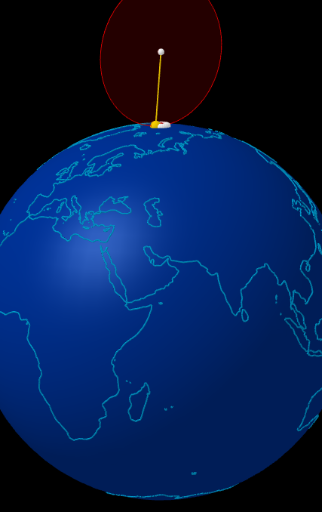
This example demonstrates the Foucault pendulum effect: the oscillation plane rotates gradually, with the rotation rate depending on latitude. The construction visualizes how Earth’s rotation changes the pendulum’s plane orientation over time using a 3D geometric and parametric model. Key mathematical ideas include 3D vector representation, rotation (transforming direction vectors), angle relationships, orthogonal planes, and parameter-driven motion that can be interpreted in a differential/kinematic sense. Construction highlights: Sphere models the Earth; Vector, Point, and Segment define the pendulum and direction elements; Circle and Tangent create relevant circular geometry and tangency constraints; UnitVector and Rotate perform the actual rotational updates; OrthogonalPlane builds planes perpendicular to the current direction, while Intersect locates their intersections. Sequence and PolyLine generate a time-stepped direction/trajectory visualization, controlled by animation parameters such as α, t0, t1, dt, tt, and variables for latitude/longitude, direction, velocity, scale, and re/initialization controls. Suitable for advanced high-school STEM demonstrations and early university coursework on geometric construction, vector transformations, and physics-math modeling.
GeoGebra Commands & Parameters
Sphere((0, 0, 0), (0.999 * 5)) → tierraVector((1; (-rot) + 180°; (-inclinacion))) → dirSphere((0, 0, 0), 5) → esferaCircle(PS, (5; arg(A); 0°), PN) → merATangent(A, merA) → tanA,UnitVector(tanA) → uARotate(A + uA, ((-k) * f), A, dirA) → BUnitVector(dirA) → uCircle(O, (0.994 * 2), nF) → cirFPoint(cirF) → MSegment(O, M) → hUnitVector((O - M) ⊗ nF) → nSequence(Rotate[A + (r * uA), (k * 15°), A, dirA], k, 0, 23) → HorasFRotate(reg, f, PN) → reg1Rotate(A, α, O, nF) → A1OrthogonalPlane(A, dirA) → planoAPolyLine(reg1) → polCircle(A, 0.2, dirA) → cIntersect(Segment[M - dirA, M], planoA) → M'Intersect(Segment[A1 - dirA, A1], planoA) → A1'Circle((0, 0, 0), 5, Line[PS, PN]) → ecuadorRotate(A, (-α), O, nF) → A2Intersect(Segment[A2 - dirA, A2], planoA) → A2'Segment(A, If[op1a, A2' + (0.02 * UnitVector[A2' - A]), A1' + (0.02 * UnitVector[A1' - A])]) → i
AI Drawing Prompt Reference
Draw a 3D sphere representing the Earth with its center at the origin and a radius of 5. From the center of the sphere, draw a vector pointing to the surface of the sphere, indicating the pendulum's direction. Rotate the vector around the Earth's center to simulate the effect of Earth's rotation on the pendulum's plane. Create a plane perpendicular to the vector and draw a series of circles on this plane to represent the Earth's meridians and parallels. Use rotation and translation commands to simulate the pendulum's motion on the Earth's surface, ultimately generating a time-varying trajectory line.
The prompt above was compiled from the original drawing commands and is for reference only.