
3-Step Transformation Quiz: Reflection, Rotation & Translation
Loading the math board and drawing, please wait…
In collections
Translations, Rotations, Reflections Exercises
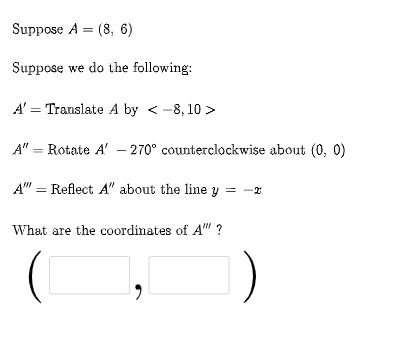
This GeoGebra example presents an interactive quiz that demonstrates how to apply three successive geometric transformations to an initial figure, producing the target configuration and verifying the correspondence. The key mathematics includes geometric transformations (reflection, rotation, translation), vector-based representations, and the idea of chaining transformations (a transform pipeline) to track points through multiple steps. Construction-wise, the setup uses Random and RandomElement to generate different parameters for each quiz instance, Vector to build displacement and point-related vectors, and If to switch logic based on conditions. Textfield and multiple transformation intermediates (e.g., FirstTrans, SecondTrans, Thirdtrans) organize the three-step results, while point/label objects such as P1, P2, P3 and their auxiliary counterparts store transformed positions. Lists like masterlist and secondlist help manage generated data, and UI elements (e.g., button1 with text feedback objects) enable guided interaction. Suitable for middle and high school geometry, practice on transformation understanding, and self-checking exercises using coordinate/constructive verification.
GeoGebra Commands & Parameters
Random(-10, 10) → aRandom(-10, 10) → bRandom(1, 3) → FirstTransRandom(1, 3) → SecondTransRandom(-10, 10) → cRandom(-10, 10) → dVector((c, d)) → uRandom(-10, 10) → c2Random(-10, 10) → d2Vector((c2, d2)) → vIf(n1 ≟ 1, {2, 3}, n1 ≟ 2, {1, 3}, n1 ≟ 3, {1, 2}) → secondlistRandom(-10, 10) → fRandom(-10, 10) → gRandomElement(m) → ang1Random(1, 3) → ThirdtransRandom(-10, 10) → kRandom(-10, 10) → lVector((k, l)) → wRandomElement(l1) → hIf(n1 ≟ 1, Translate[A, u], n1 ≟ 2, Rotate[A, ang1, P2], n1 ≟ 3, Mirror[A, h]) → A1If(n2 ≟ 1, Translate[A1, u], n2 ≟ 2, Rotate[A1, ang1, P2], n2 ≟ 3, Mirror[A1, h]) → A2If(n3 ≟ 1, Translate[A2, u], n3 ≟ 2, Rotate[A2, ang1, P2], n3 ≟ 3, Mirror[A2, h]) → A3Textfield(e1) → InputBox1Textfield(e2) → InputBox2If(e1 ≟ x(A3), "√", "X") → text14If(e2 ≟ y(A3), "√", "X") → text15
AI Drawing Prompt Reference
Start with an initial shape and apply three successive transformations: reflection, rotation, and translation. First, randomly choose a reflection operation, then select a random rotation angle and center, and finally generate a random translation vector. Based on the randomly chosen transformation types, sequentially apply reflection, rotation, and translation to the initial shape to generate the final shape. Text fields are provided to verify the coordinates of the final shape.
The prompt above was compiled from the original drawing commands and is for reference only.