
Pentagon with Circle via Barycenter
Loading the math board and drawing, please wait…
In collections
Besondere Punkte/Special Points
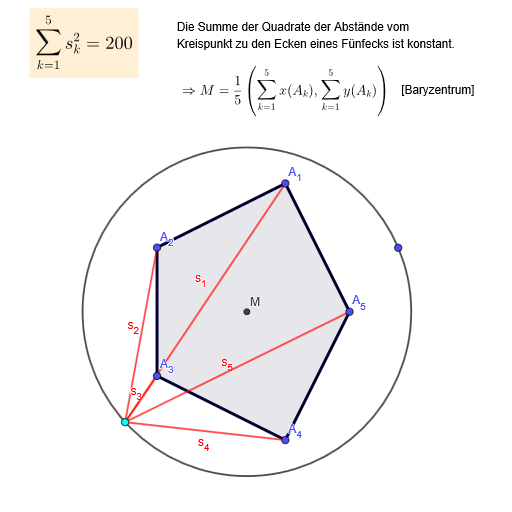
This GeoGebra example demonstrates the geometric construction of a pentagon together with an associated circle and the pentagon’s barycenter (geometric mean of its vertices). It helps visualize how a barycenter is positioned relative to a symmetric polygon and how such mean-based points relate to circle geometry. The key concepts include barycenter/vertex mean values (corresponding to arithmetic mean and mean values), polygon geometry, circle construction, and intuition about symmetry and correlations in geometric configurations. Construction-wise, it uses GeoGebra commands Polygon to define the pentagon from vertices A_1…A_5 (and the polygon object), Circle to create the circle, Point and Segment to create and connect key points such as G (barycenter) and auxiliary points like M, along with segments a–e used in the construction. Text objects (Text1–Text4) label important results. Suitable for secondary to early university geometry lessons, and for exploratory activities on barycenters, symmetry, and constructive geometry.
GeoGebra Commands & Parameters
Polygon(A_{3}, A_{4}, A_5, A_1, A_2) → Vieleck1, a, b, c, d, eCircle(M, G) → fPoint(f) → HSegment(A_1, H) → s_1Segment(A_2, H) → s_2Segment(A_{3}, H) → s_3Segment(A_{4}, H) → s_4Segment(A_5, H) → s_5
AI Drawing Prompt Reference
Draw a regular pentagon and mark its geometric barycenter inside. Using the pentagon's centroid as one endpoint of the radius, draw a circle with another point as the center. Pick a point on the circle and connect it to all five vertices of the pentagon, creating five line segments radiating from the pentagon's corners to the point on the circle.
The prompt above was compiled from the original drawing commands and is for reference only.