
Schraubenlinie: Parametric Curve of Complex Exponential
Loading the math board and drawing, please wait…
In collections
complex-numbers
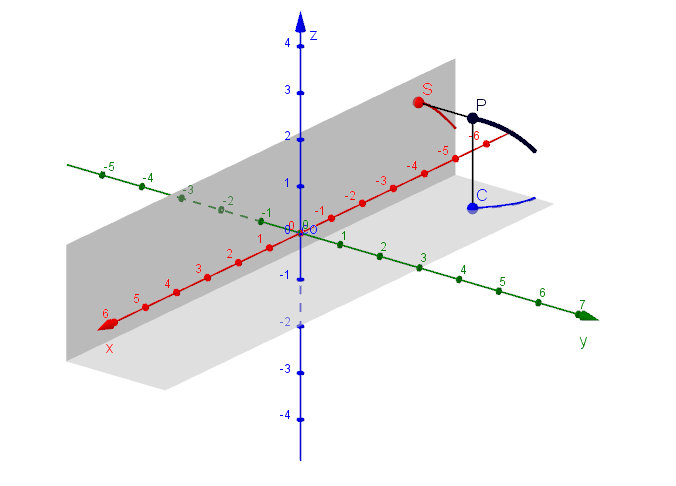
This example demonstrates the geometric representation of the complex exponential function in parametric form. Key mathematical concepts include complex numbers, trigonometric functions, and parametric equations. Construction involves GeoGebra commands such as CurveCartesian, Segment, and Surface. Suitable for high school or university mathematics courses to understand the geometric meaning of complex numbers and trigonometric functions.
GeoGebra Commands & Parameters
CurveCartesian(t, cos(t), -1, t, (-2 * pi), s) → coCurveCartesian(t, -1, sin(t), t, (-2 * pi), s) → siSegment(P, S) → fSegment(P, C) → gCurveCartesian(t, cos(t), sin(t), t, (-2 * pi), s) → spSurface(u, v, -1, u, (-2 * pi), (2 * pi), v, -1, 1.5) → e1Surface(u, -1, v, u, (-2 * pi), (2 * pi), v, -1, 1.5) → e2
AI Drawing Prompt Reference
Draw the parametric Schraubenlinie (complex exponential) geometry. Let the parameter t range from −2π to 2π and plot the component curves showing the roles of cos(t) and sin(t): one curve uses x = cos(t) with constant y = −1, and another uses x = −1 with y = sin(t). Then plot the full parametric curve combining x = cos(t) and y = sin(t) over the same t-interval. Add line segments connecting a reference point to the corresponding endpoint positions to emphasize the construction. Finally, generate a pair of curved surface patches over parameters u and v, one with v varying in the height direction and another with the fixed parameter placed differently, using the shown z-extents (from −1 to 1.5) to form the surrounding surface structure.
The prompt above was compiled from the original drawing commands and is for reference only.